
Stayntouch PMS
Release Notes (v6.08)
Effective:
- 23 June 2026 (6am EST) for customers using https://app.us2.stayntouch.com/
- 25 June 2026 (6am EST) for customers using https://app.us1.stayntouch.com/
- 30 June 2026 (3pm EST) for customers using https://app.eu1.stayntouch.com/
TABLE OF CONTENTS
- Actions
- Financials
- Rates
- Reports/Exports
- Stayntouch Guest Mobility & Kiosk
- Integrations
- For Developers
- Bug Fixes
- iHotelier: Duplicate Reservation Fix
- Duplicate Payment Triggered by Instant Deposit When Adding Card
- Payment Link iFrame Loading Issue Resolved
- Adyen: Duplicate Transactions from Double Webhook
- Refunds Misrouted as Voids
- Refused Authorizations Showing as Negative Balances
- Recurring Payment Failure
- Payment Authorization: Type Mismatch Fix

- Housekeeping Actions: Visible and actionable from Room Status and Room Details screens.
- PO Number: OTA booking references flow automatically to routing instructions and invoices.
- Corporate Rates in Rate Strategy: Contracted and public rates managed in one place.
- Financial Transactions Export: External references, charge code filtering, and extended date ranges added.
- Configurable Guest Check-In Journey: Customize the check-in flow on Stayntouch Guest Mobility and Kiosk per property.
Actions
Housekeeping Actions: Visible Where Your Team Works
Housekeeping managers can see and manage actions without switching screens. This release brings actions into the housekeeping workflow in three connected ways.
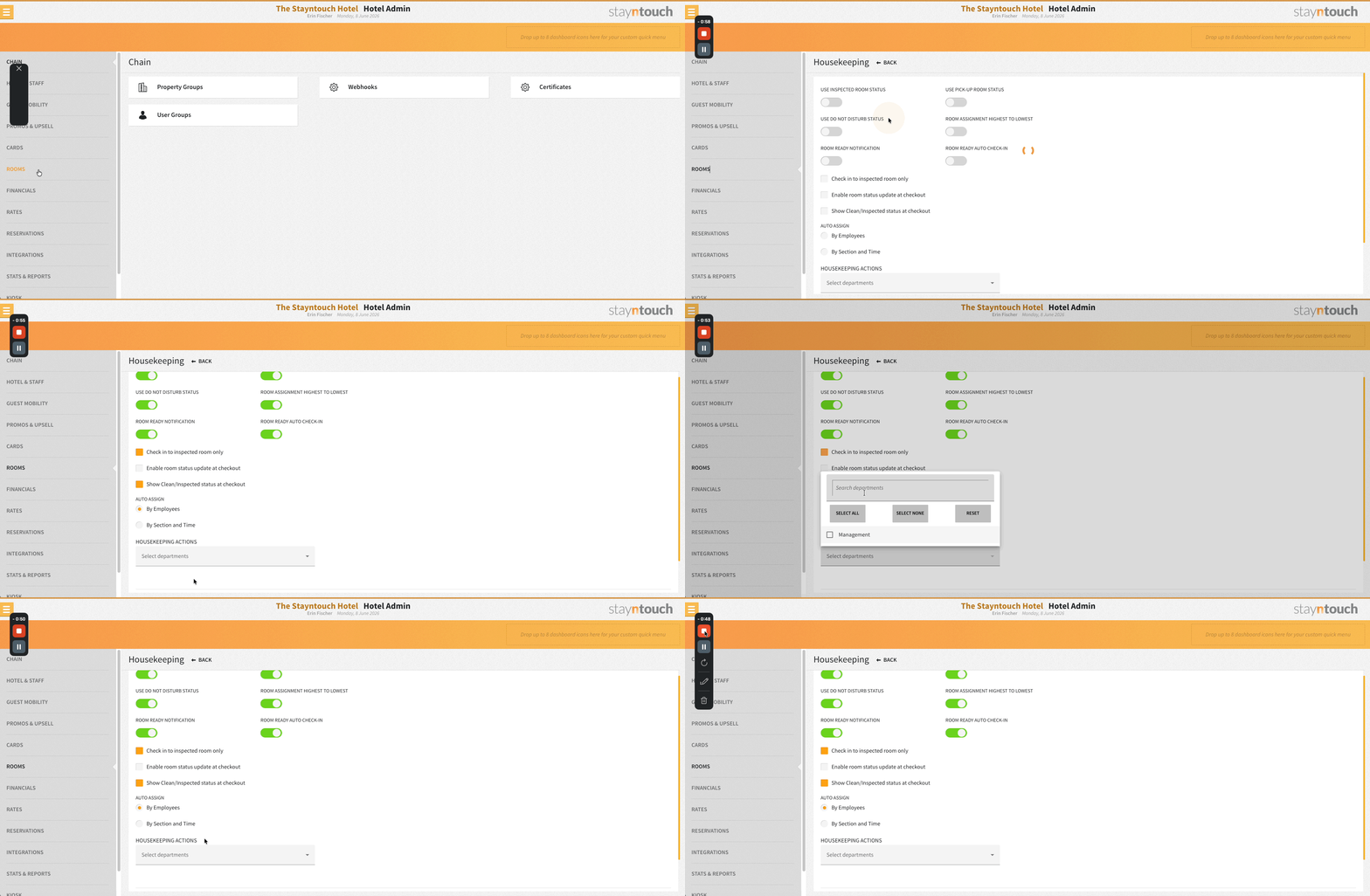
Control Which Actions Appear in Housekeeping
A new Housekeeping Actions setting under Settings > Rooms > Housekeeping lets you select which departments’ actions are shown on housekeeping screens. Only actions from selected departments will appear. By default, no departments are pre-selected, and deleted departments are excluded automatically.
Action Status Icons on Room Status
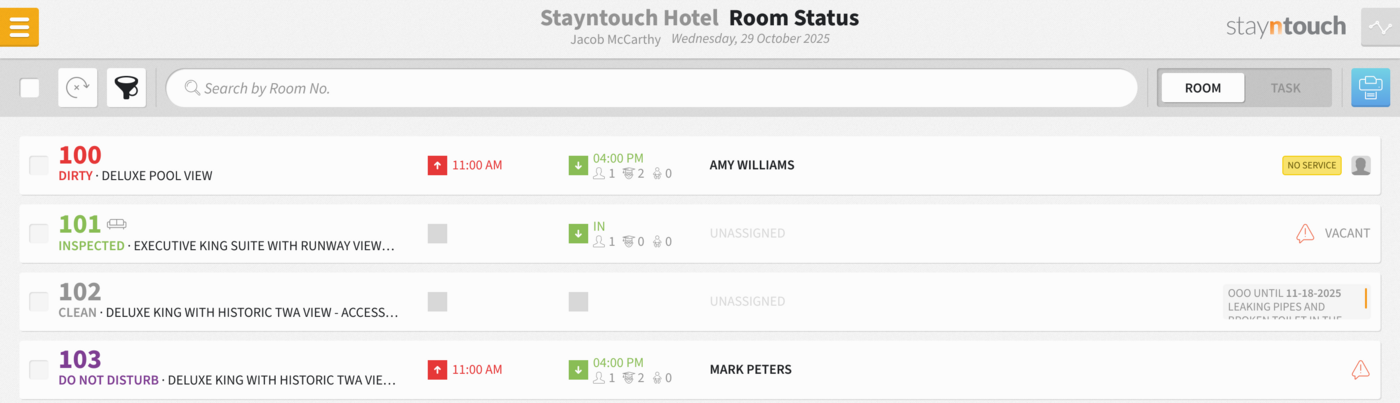
The Housekeeping > Room Status screen displays an action status icon on any room with Actions due today from the configured departments. One icon per room, visible across room, task, and print views, and for all rooms in a suite.
Actions Visible from Room Details
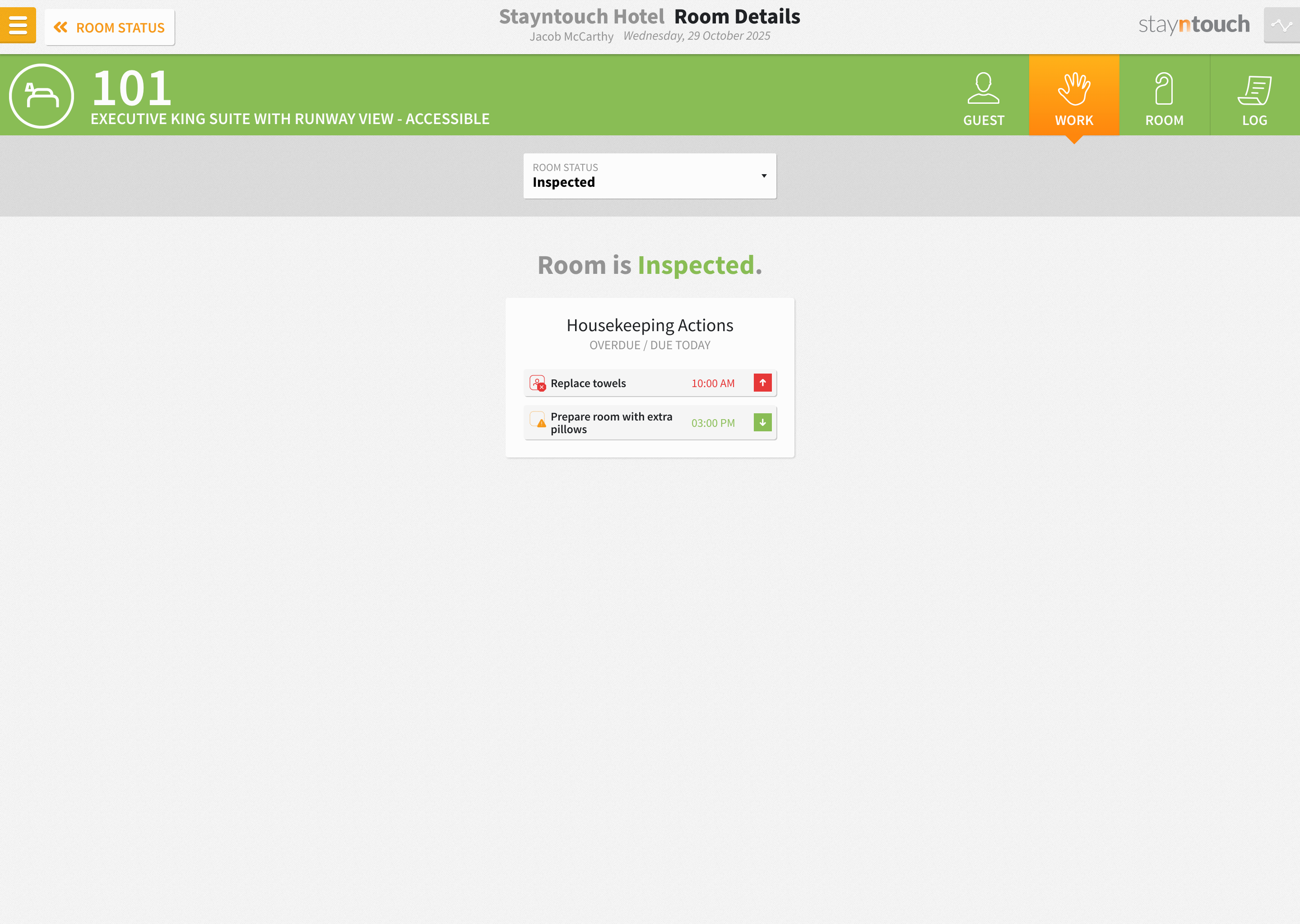
From the Room Details screen, staff can see and access today’s actions for arriving, departing, and stayover guests directly alongside the task controls, with a quick link to the Action Manager. Available on desktop, tablet, and mobile.
Note: In a future release, you will also be able to edit and complete actions directly from the Room Details screen.
Financials
PO Number: From Booking Reference to Invoice, Automatically
A new PO Number field is available, designed to carry an OTA booking reference or purchase order number through the full reservation and billing lifecycle. Once a PO number is on a reservation, it flows automatically to routing instructions and invoices, eliminating manual re-entry across systems.
A PO number can be added to a reservation in three ways:
- Manually: Hotel staff can add a PO number directly on the stay card from the External References section at any time. Please note, any changes to the PO Number field in External References must be updated in Bills > Bill Routing > Reference Number manually.
- Via Connect APIs: Partners can include a PO number in a POST /reservations request using External Reference Type: PO_NUMBER with primary: true. A company or travel agent (account_number or access_code) must also be included for routing to be applied automatically.
- Via iHotelier: When the Copy OTA Booking Number to PO Number setting is enabled via Settings > Integrations > Central Reservation System > iHotelier, the OTA booking number is automatically saved as the PO number when the reservation arrives. This setting is off by default.
How it flows through billing:
- For OTA bookings and Connect API reservations, a company or travel agent must be attached to the reservation, and bill routing must be pre-configured on the company or travel agent card. When this is in place, the PO number is automatically copied to the routing instruction’s Reference Number field.
- For manually entered PO numbers, the value is copied to any existing bill routing instructions, and to any new routing instructions added subsequently.
- When an invoice is generated for a routed bill, the Reference Number appears on the invoice header, giving the receiving party the PO reference they need for reconciliation.
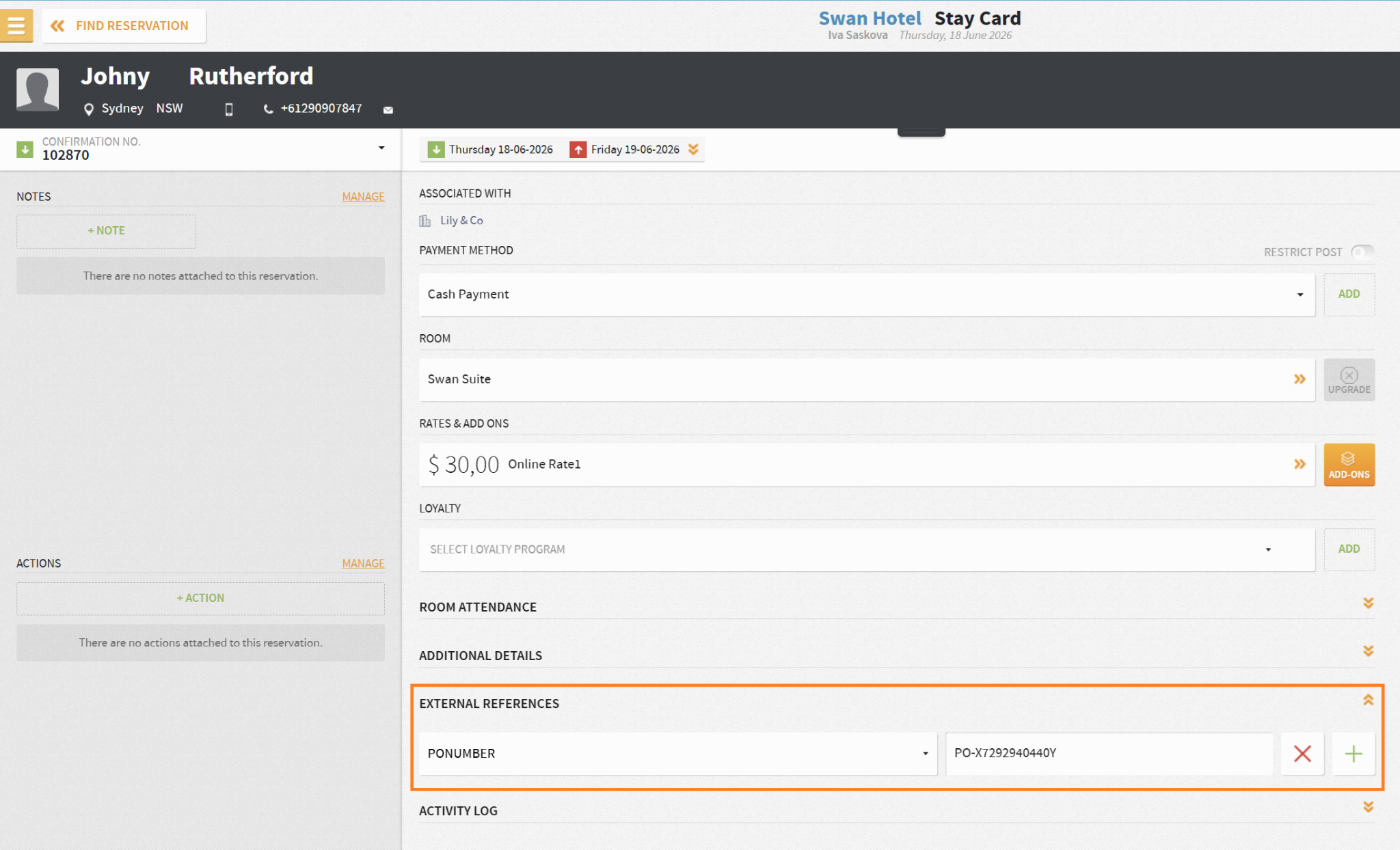
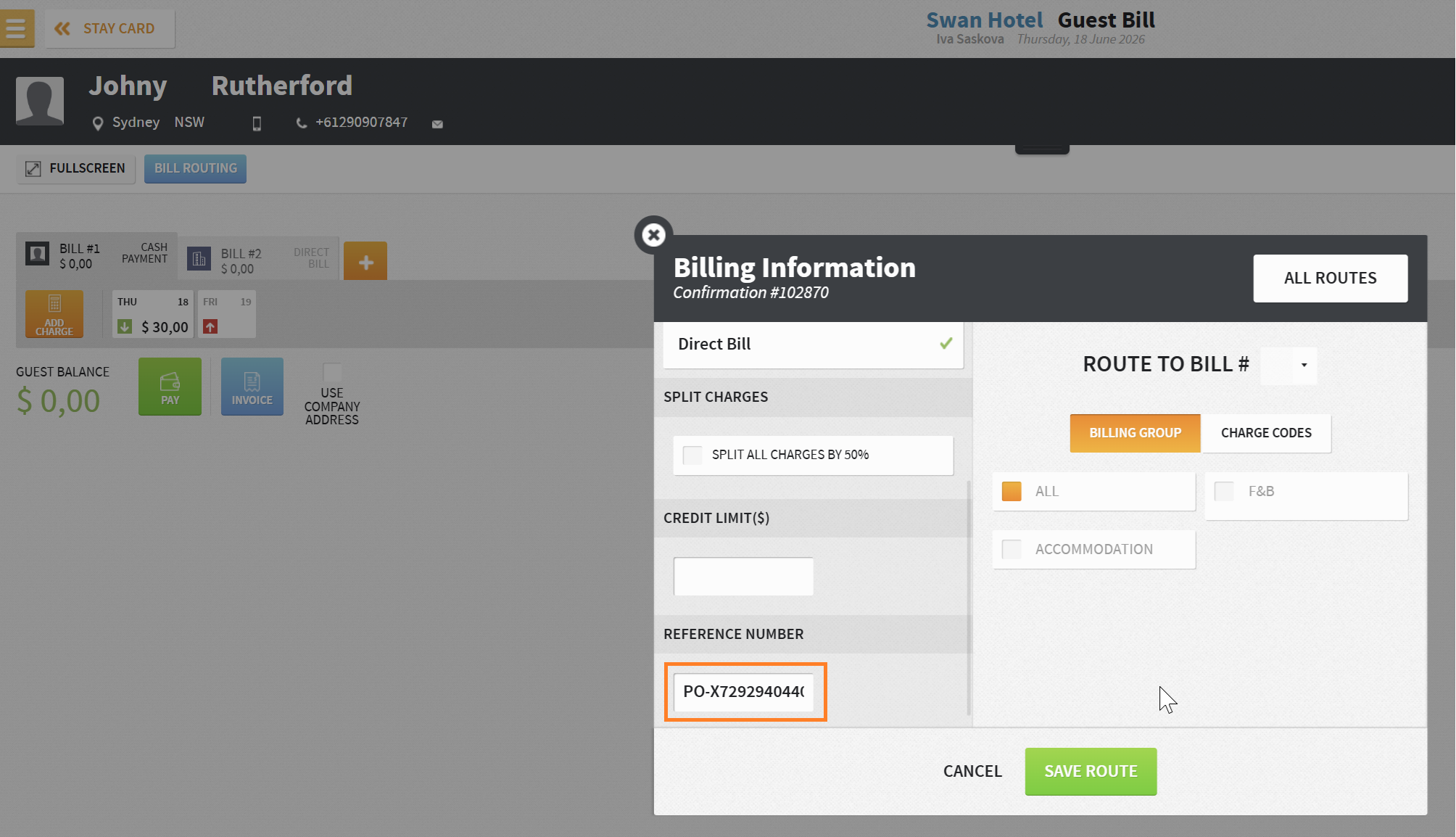
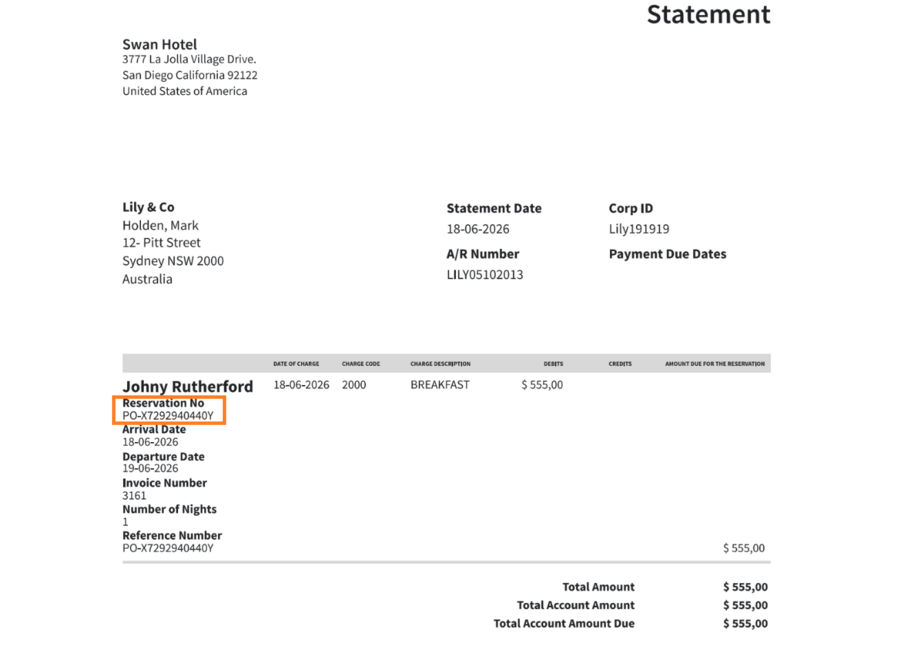
All PO number activity is tracked in the Activity Log: creation, automatic population, and any updates or changes.

Default Reservation Type for VCC Auto-Routing
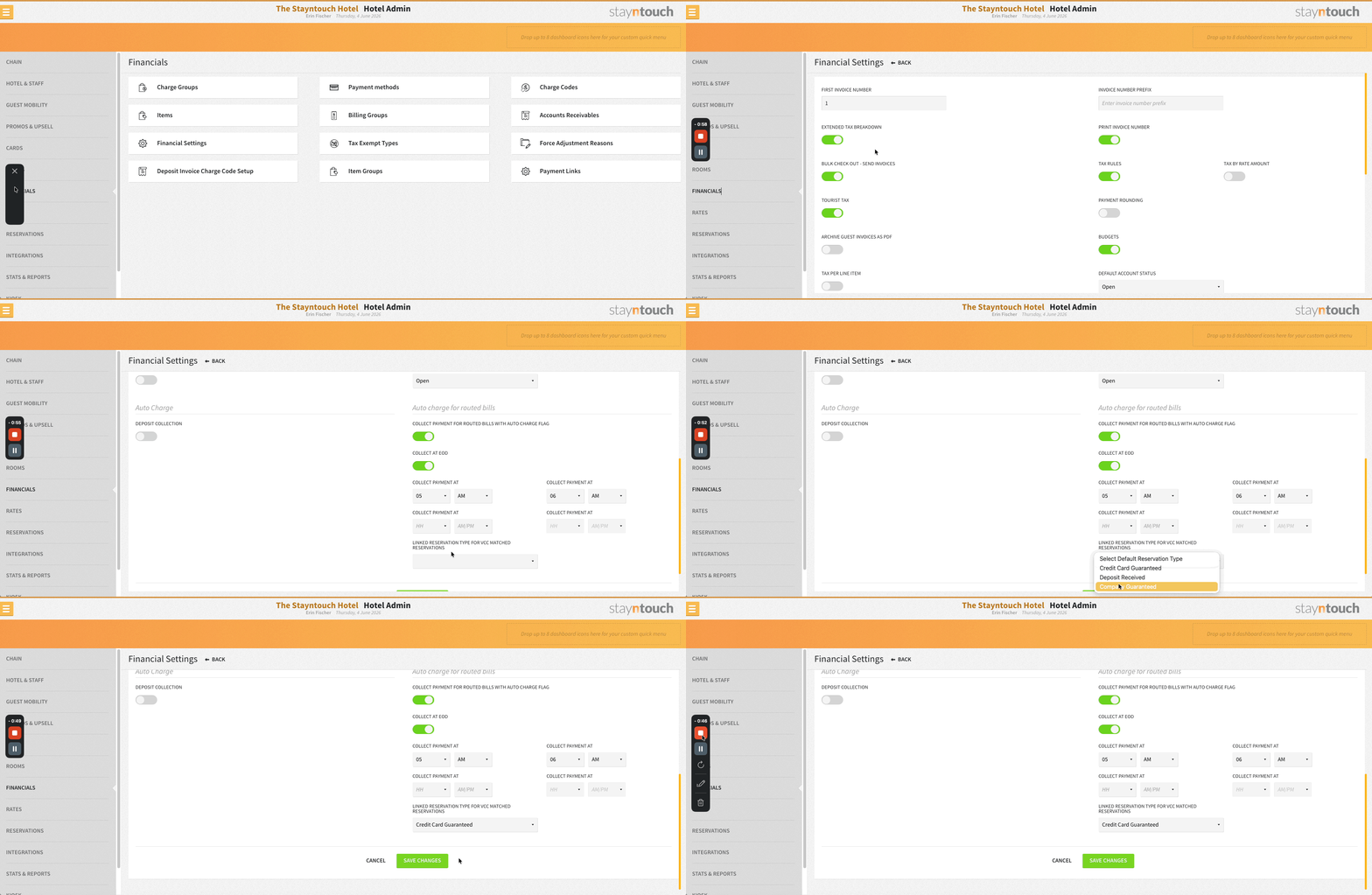
A new Linked Reservation Type for VCC Matched Reservations setting is available under Settings > Financials > Financial Settings > Auto charge for routed bills. When a reservation’s Name on Card matches your configured VCC criteria and auto-routing is applied, the reservation type updates automatically to the linked type, helping your team identify and categorize VCC-managed reservations. OTA reservation updates will also re-evaluate VCC matching and update the type accordingly.
Rates
Rate Strategy: Corporate Rates
Corporate rates are visible and editable within Rate Strategy. The Rate Manager displays corporate and public rates together, giving revenue managers a complete picture when making pricing decisions.
Reports/Exports
Room Status Scheduled Report: PDF Format
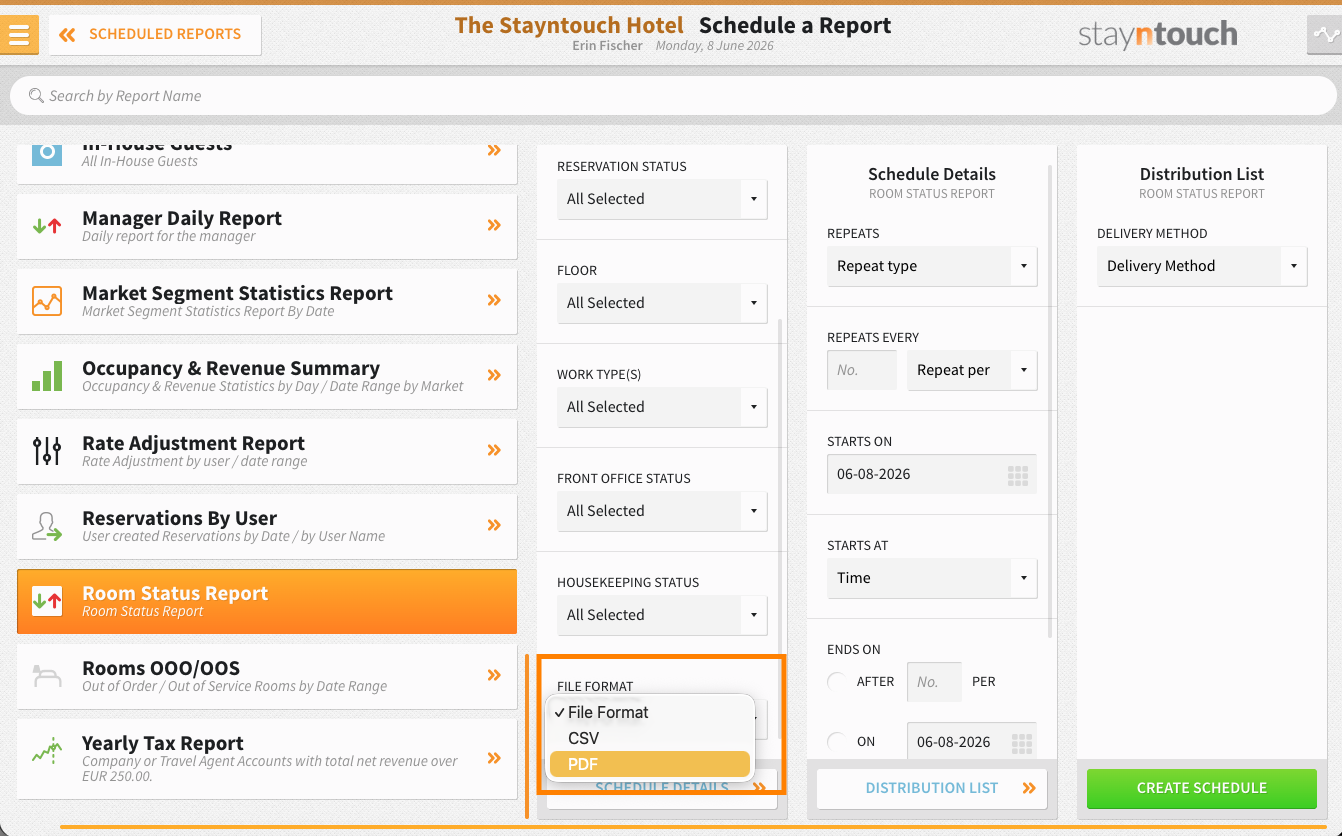
PDF is available as a file format for the scheduled Room Status Report, via Reports > Schedule a Report/Export > Scheduled Reports. Reports are delivered to your configured email or Google Drive in the same format as the existing CSV option.
Party Filter: Arrival, In-House & Departure Reports
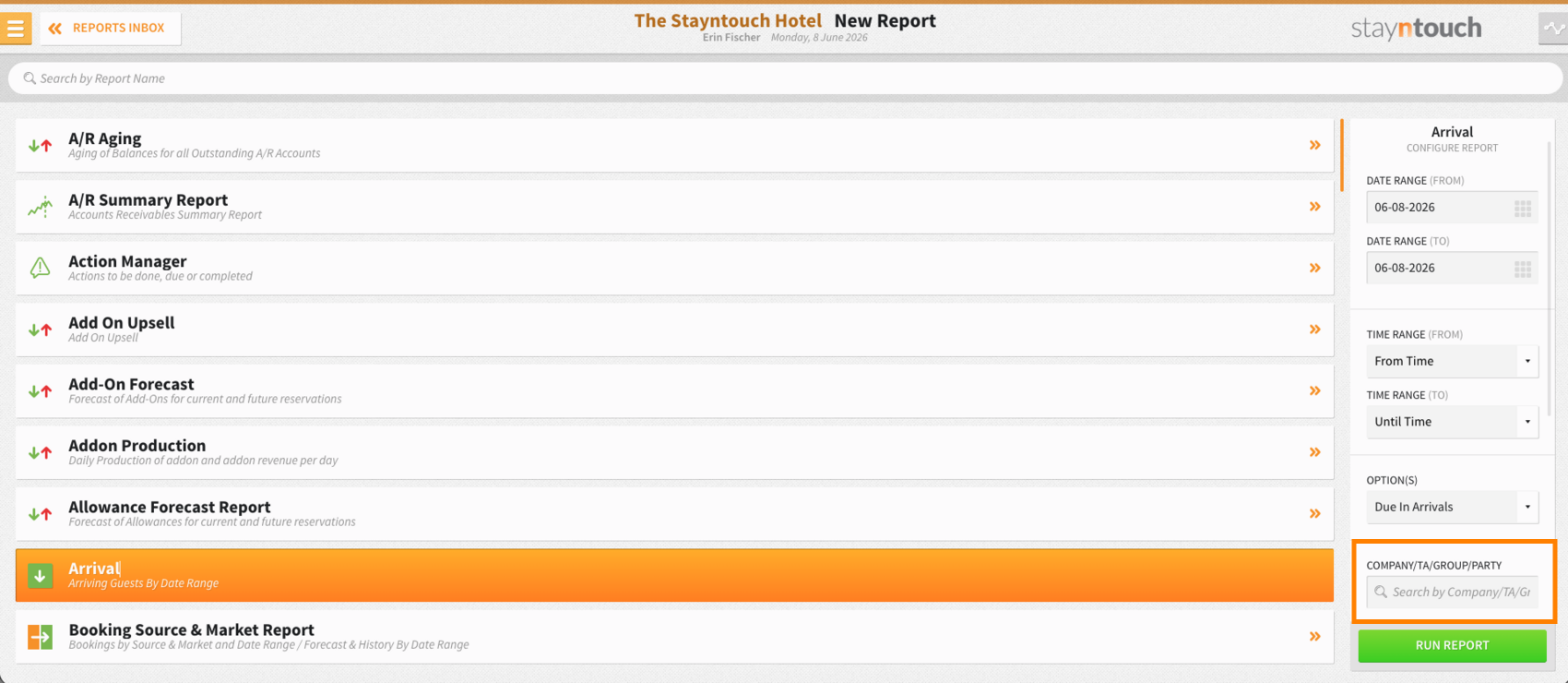
The Arrival, In-House, and Departure Reports can be filtered by party, alongside the existing group, company, and travel agent options. The search bar has been updated to Company/TA/Group/Party to reflect this.
Financial Transactions Export: Three New Enhancements
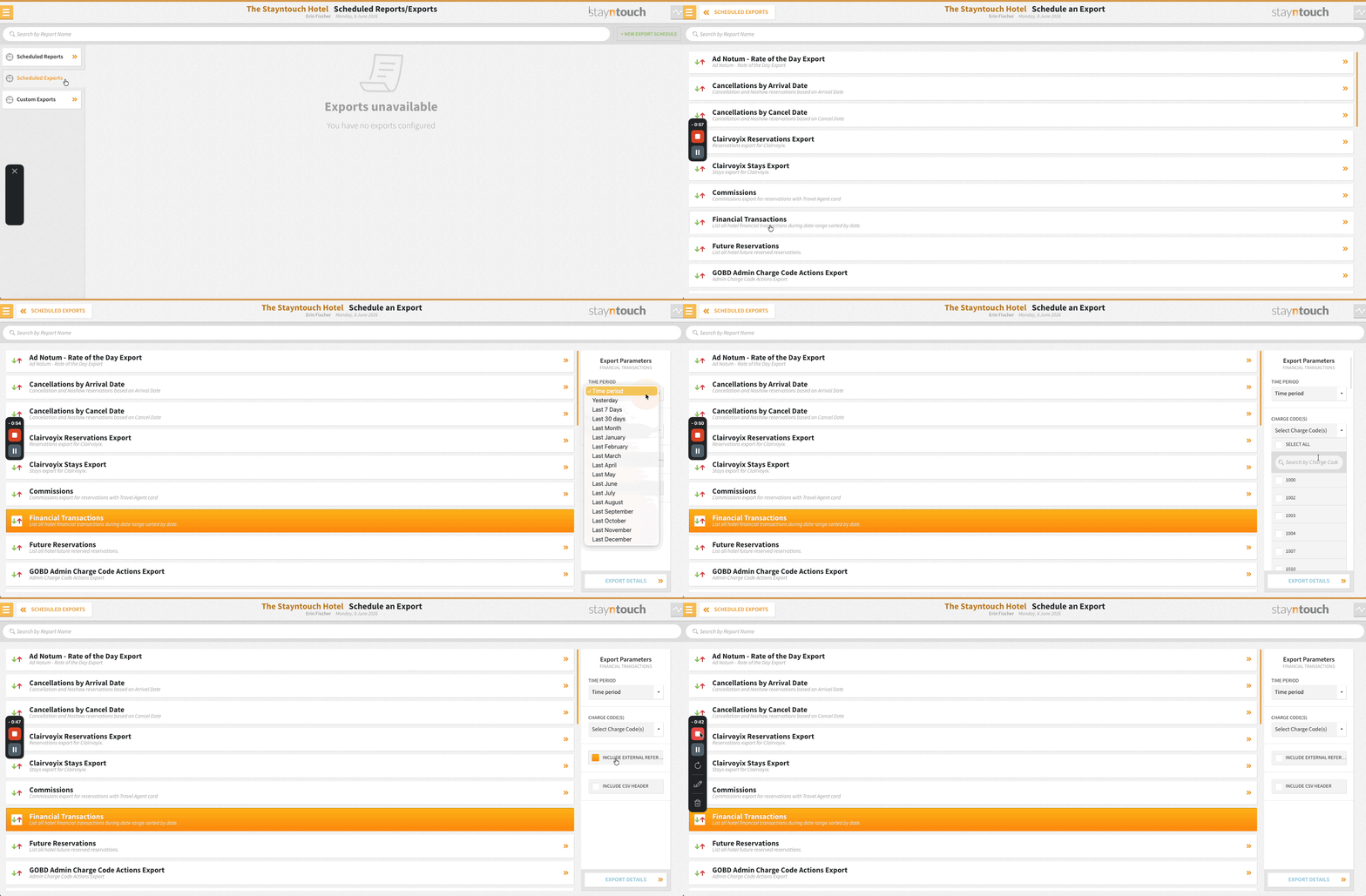
- External Reference Column: An optional Include External Reference toggle in Schedule Parameters adds the primary external reference (OTA booking ID or channel manager reference) immediately after the Confirmation Number column. Disabled by default, with no impact on existing column order when off.
- Extended Time Period Options: Last 7 Days, Last 30 Days, Last Month, and specific historical months (Last Jan–Dec) added. Rolling options calculate from the scheduled run date; month-based options always return the complete calendar month.
- Charge Code Filter: A new Charge Code(s) multi-select option in Schedule Parameters restricts the export to specific active charge codes. All codes are included by default. Selections persist on future edits.
Stayntouch Guest Mobility & Kiosk
Guest Email Handling for OTA Reservations: Improved
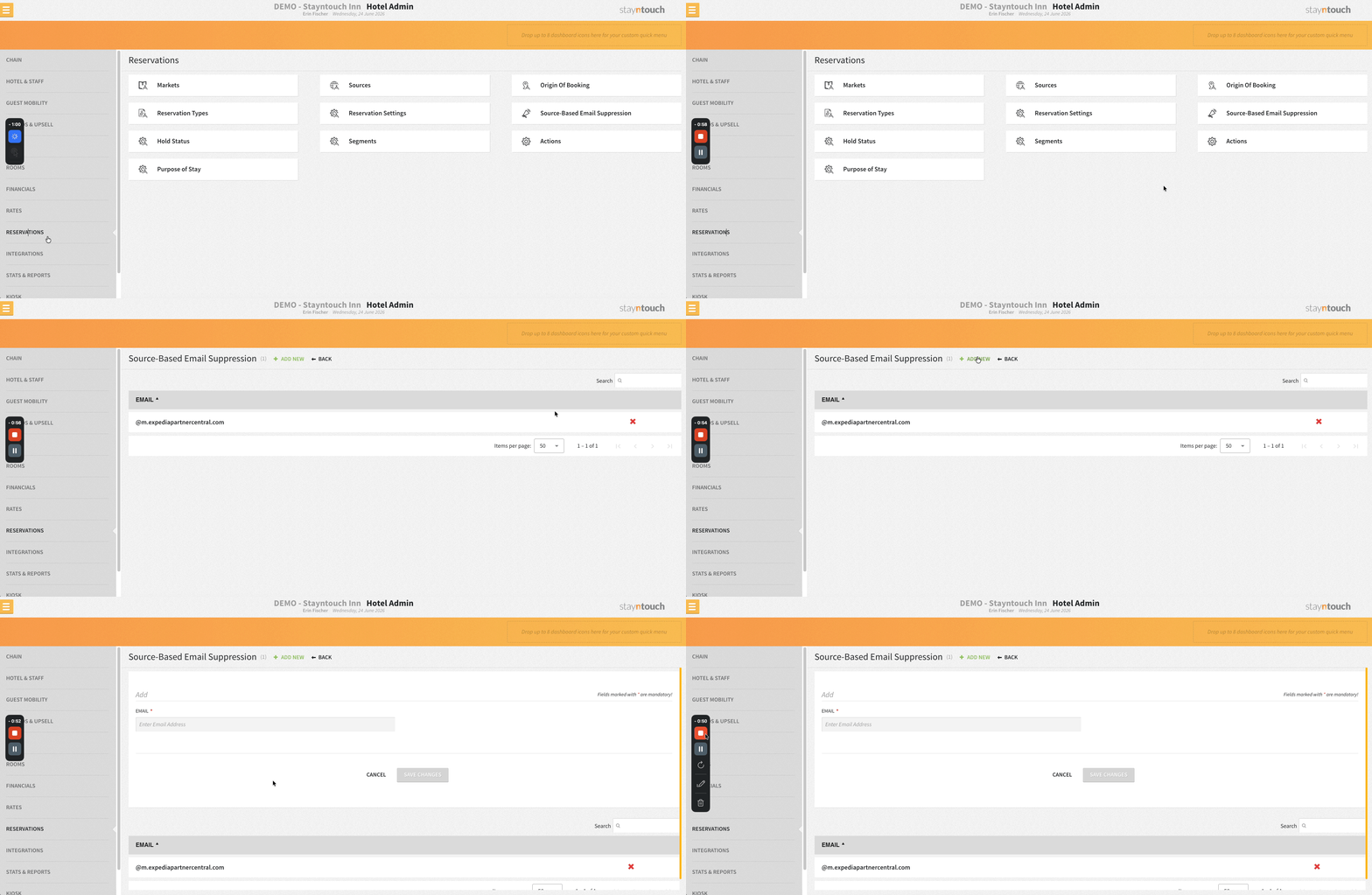
Blacklisted email addresses, including OTA-provided emails matched by exact address or domain rules, are treated as missing during Guest Mobility and Kiosk check-in. Guests are always prompted to confirm or provide their own email, ensuring accurate identification and reliable delivery of transactional communications. Valid guest emails continue to pre-populate and can be updated.
Please note, the Email Blacklist setting used to be located in Settings > Guest Mobility > Email Blacklist. With this enhancement, the name and the location has changed and moved to Settings > Reservations > Source-Based Email Suppression.
Customizable Check-In Guest Journey (Pilot)
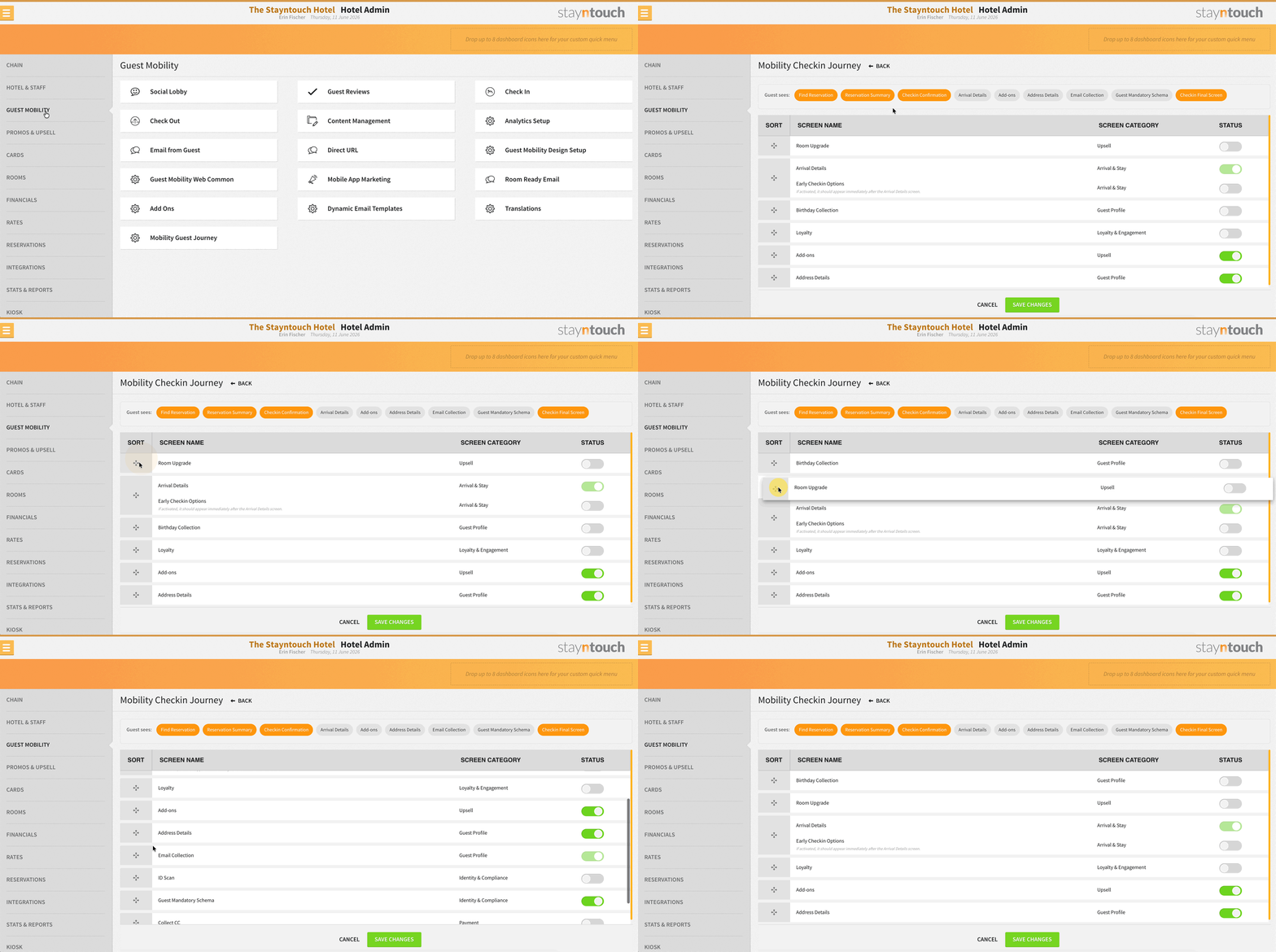
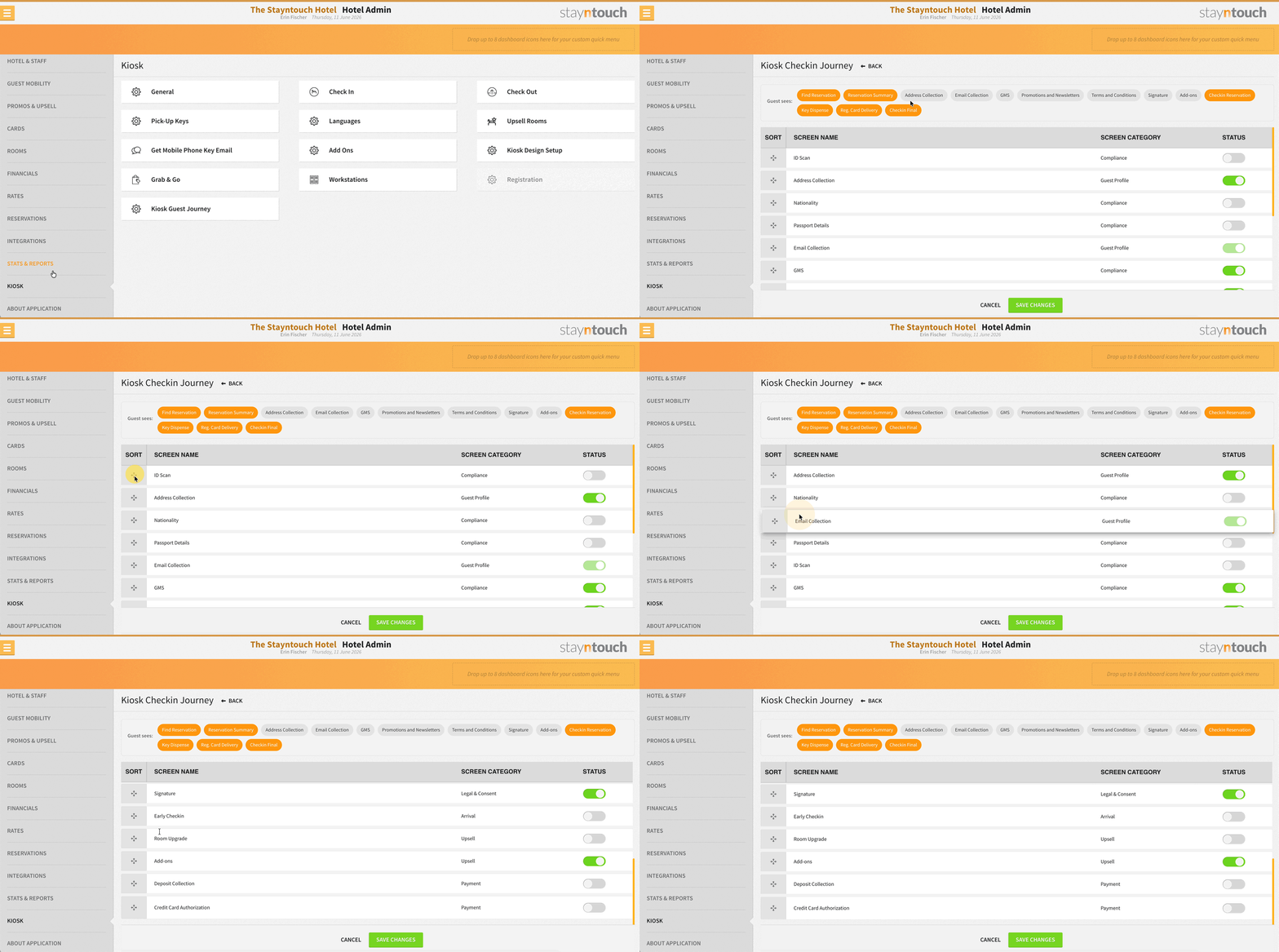
Properties can configure the order and content of the check-in journey on both Stayntouch Guest Mobility and Kiosk. Hotel Admin users can activate or deactivate individual screens and reorder the flow using drag-and-drop. This Phase 1 release covers check-in configuration only; check-out journey configuration is planned for a future release.
- Stayntouch Guest Mobility: Settings > Guest Mobility > Mobility Guest Journey
- Stayntouch Guest Kiosk: Settings > Kiosk > Kiosk Guest Journey
Note: This feature is in pilot. Contact Customer Support to enable it for your property.
Integrations
New Integration Partners
The following new partners are available globally. Contact your Client Success Manager or Customer Support for more information.
HotelTrader | CRS
RoomOpsLive | Housekeeping
LodgIQ (Enhanced) | RMS & Business Intelligence
Laasie Retain | Loyalty
Auctores | Supply
Guestpulse | CDP
Resync Protection: External Requests
Repeated identical all-rooms resync requests (Comtrol #78) received within a 60-minute window are automatically blocked, preventing unnecessary system load from faulty external integrations. Applies to reservation, station, room, and diary/generic sync types.
Duetto: Group Header Market Code for Custom Group Rates
When a group has a custom group rate, the market code in the OTA_HotelInvBlockNotifRQ is taken from the group header demographics instead of the rate code, preventing issues from incorrectly entered rate-level data. Existing fallback behavior is preserved.
IDeaS: Group-Level Market Code for Group Bookings
When a custom group rate is used or the rate code has no market code, Stayntouch automatically pulls the market code from the group header instead of the rate plan or block data. This ensures the correct group-level market code is consistently applied.
GMS: Tourist Tax Exclusion Toggle
A new Do Not Send Tourist Tax toggle is available under Settings > Integrations > Customer Relationship Management > GMS. When enabled, tourist tax amounts are excluded from reservation messages sent to the CRS, preventing duplication in properties where tourist tax is handled separately from tax-inclusive rates.
SynXis: Loyalty Redemption Notes
Loyalty redemption details are extracted from both “Create Booking” and “Modify Booking” messages and written automatically into reservation notes in the PMS. For “Modify Booking” messages, notes are only added when loyalty redemption details change, preventing duplicate entries.
For Developers
PO Number: POST /reservations
A new external reference type PO_NUMBER is supported in POST /reservations. Use type: PO_NUMBER with primary: true and no interface value. Only one PO_NUMBER entry is permitted per reservation. When a company or travel agent is included, routing instructions are applied automatically, and the PO number is copied to the Reference Number field.
routing_reference_number: GET /bills
A new routing_reference_number field is returned in GET /bills/direct_bills and GET /bills/{id}/invoice responses, surfacing the Reference Number (PO number) set in Bill Routing. Returns null when no reference number has been set.
Add-On Inventory: GET /addons/{id}/availability
A new endpoint returns real-time add-on inventory availability by date range for a specific add-on. Only add-ons with inventory tracking enabled in Hotel Settings return data. Consecutive dates with identical inventory counts are consolidated in the response.
Bug Fixes
iHotelier: Duplicate Reservation Fix
Manual CRS pushes could create duplicate reservations due to a race condition. A locking-based approach has been implemented, with further concurrency improvements planned.
Duplicate Payment Triggered by Instant Deposit When Adding Card
Some guests saw two charges when a card was added with Instant Deposit enabled. To avoid this, disable Instant Deposit before adding a card, or complete any deposit beforehand.
Payment Link iFrame Loading Issue Resolved
Failed to load despite the link being generated successfully. Resolved.
Adyen: Duplicate Transactions from Double Webhook
Duplicate PMS transactions were created when Adyen sent two webhooks for the same PSP reference. A deduplication check ensures each payment is processed only once.
Refunds Misrouted as Voids
Some refunds were incorrectly treated as voids, including a related timing mismatch with settlement processing. Affected transactions have been corrected, and additional safeguards are in place.
Refused Authorizations Showing as Negative Balances
Refused incremental authorizations were incorrectly displayed as active negative balances. Only successfully authorized transactions update existing records.
Recurring Payment Failure
A card on file could not be charged again in some cases due to no reusable payment token being returned by the provider. Resolved.
Payment Authorization: Type Mismatch Fix
Payment authorization errors caused by a string/numeric type mismatch have been resolved. EMV authorization and capture flows are functioning correctly.