
Stayntouch PMS
Release Notes (v6.11)
Effective:
- 15 September 2026 (6am EST) for customers using https://app.us2.stayntouch.com/
- 17 September 2026 (6am EST) for customers using https://app.us1.stayntouch.com/
- 22 September 2026 (3pm EST) for customers using https://app.eu1.stayntouch.com/
TABLE OF CONTENTS
- Registration Card
- Groups
- Reports/Exports
- Stayntouch Rate Strategy
- Multi-Property Functionality
- Stayntouch IBE
- Stayntouch Guest Kiosk & Mobility
- Payment Link Management (In Pilot)
- Integrations
- For Developers

- Selected Sync for CRS & Channel Managers: Sync a single rate code or room type instead of resending all data, across all 10 supported integrations.
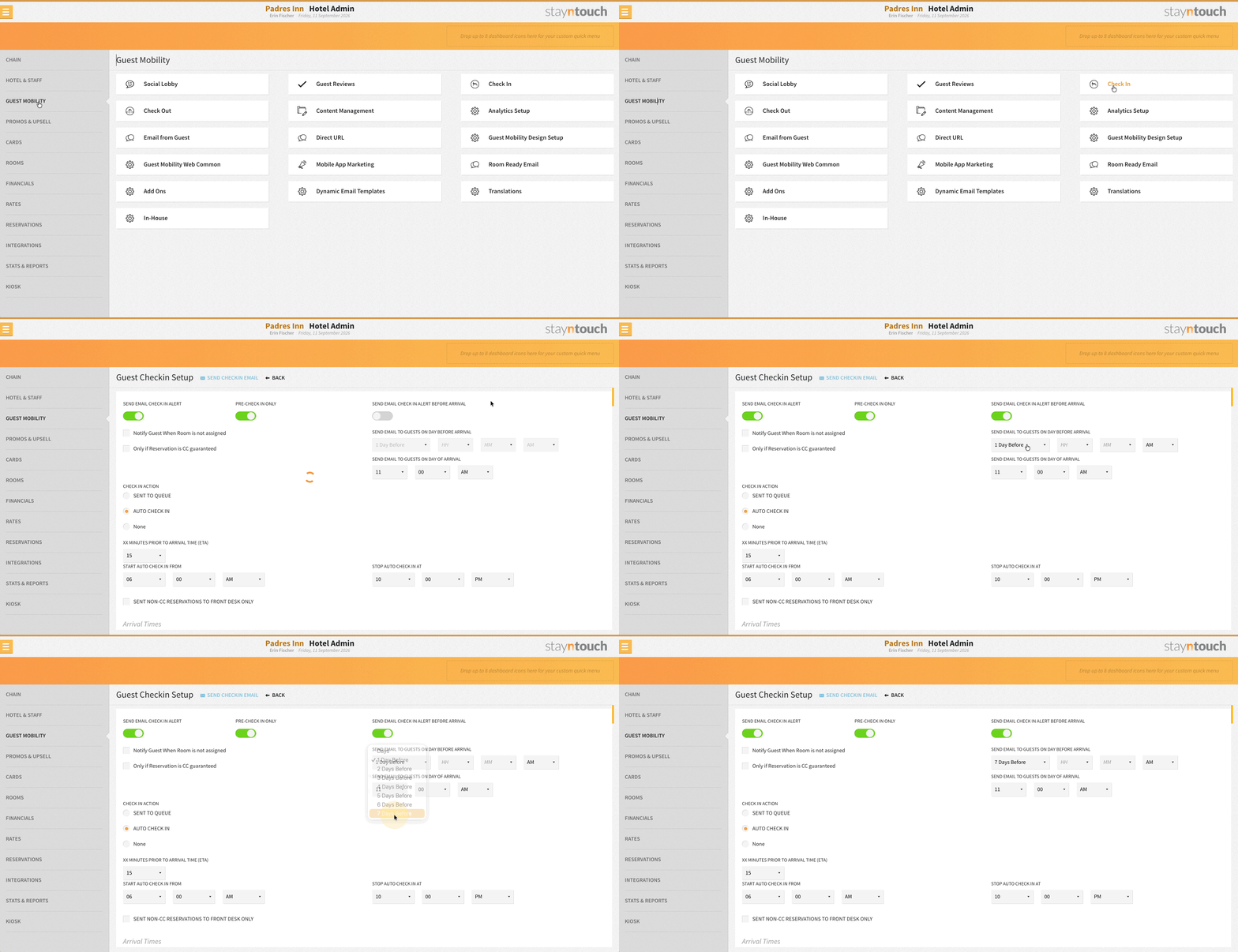
- Guest Mobility Check-In Email Timing: The check-in email can now be set to 7 days prior to arrival.
- Payment Link Management: This release introduces Payment Link Management, covering the full guest journey from booking through check-out and cancellation. This feature is currently in pilot.
Registration Card
Enforce Complete Guest Data Capture at Check-In
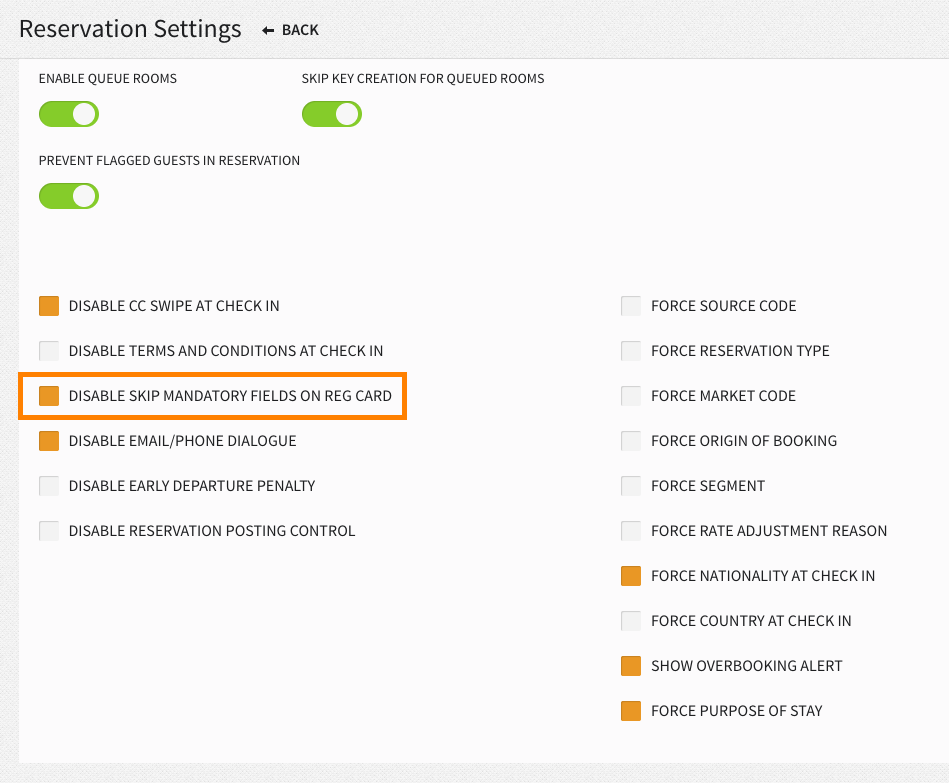
Properties with legal data-collection requirements can disable the Skip Mandatory Fields option on the Registration Card. A new setting via Settings > Reservations > Reservation Settings > Disable Skip Mandatory Fields on Reg Card lets you require full guest information before check-in can proceed. This setting is disabled by default, so existing workflows are unaffected.
Registration Card: Unreliable Email Detection
When a guest’s email on file matches an entry in the configured list of unreliable addresses and domains configured via Settings > Reservations > Source-Based Email Suppression (typically OTA relay addresses, not the guest’s own), the PMS registration card doesn’t pre-fill the email field, showing it blank and flagged red as a missing mandatory field. Staff can enter the guest’s actual email, which updates the profile, or skip mandatory fields to move past the blank field, leaving the guest's saved email exactly as it was. Applies for primary and additional guests, across check-in, queued rooms, and the Bill & Charges registration card.
Groups
Demographic Codes Auto-Inherit for Group Reservations
Individual reservations created for a group automatically inherit the group’s market segment, source code, and other booking codes whenever those fields aren’t explicitly set on the booking request, whether it comes through the PMS UI, stay card, Stayntouch IBE, or any third-party integration. Explicit codes passed in a request still take priority, so nothing changes for partners who already send their own data.
Reports/Exports
Guest Arrivals with ID Details Report
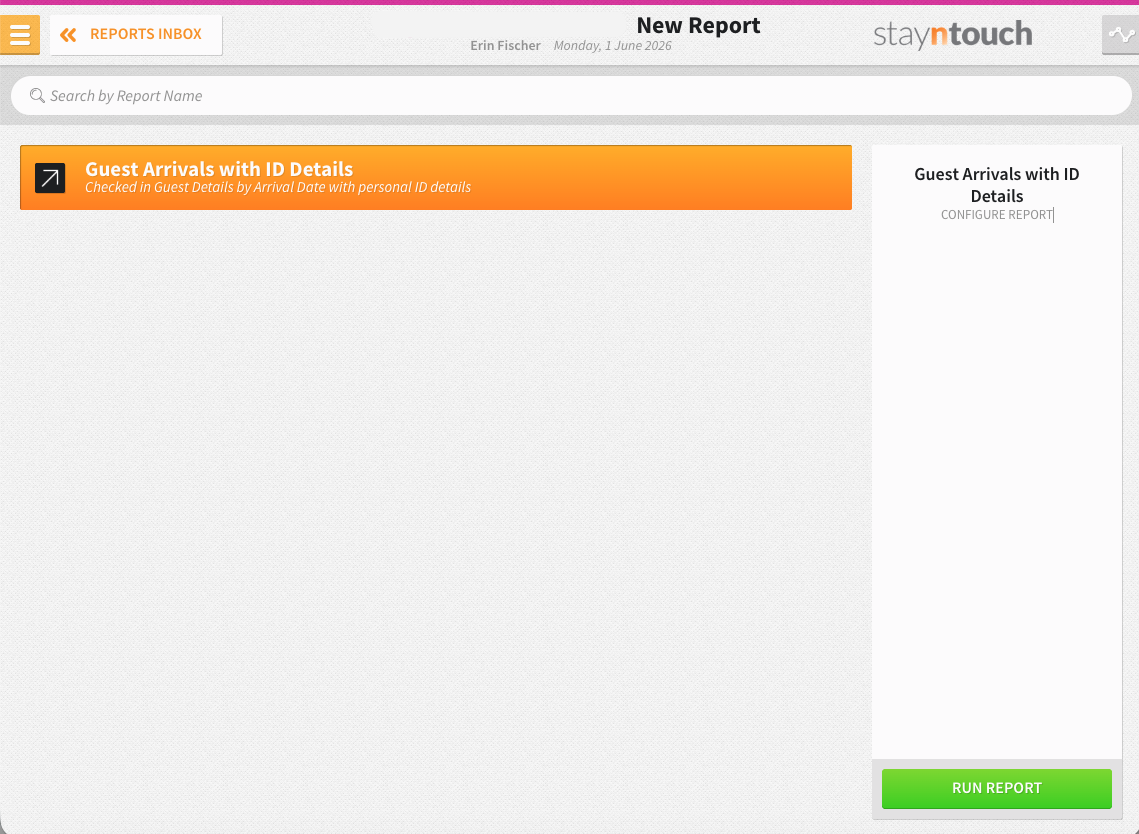
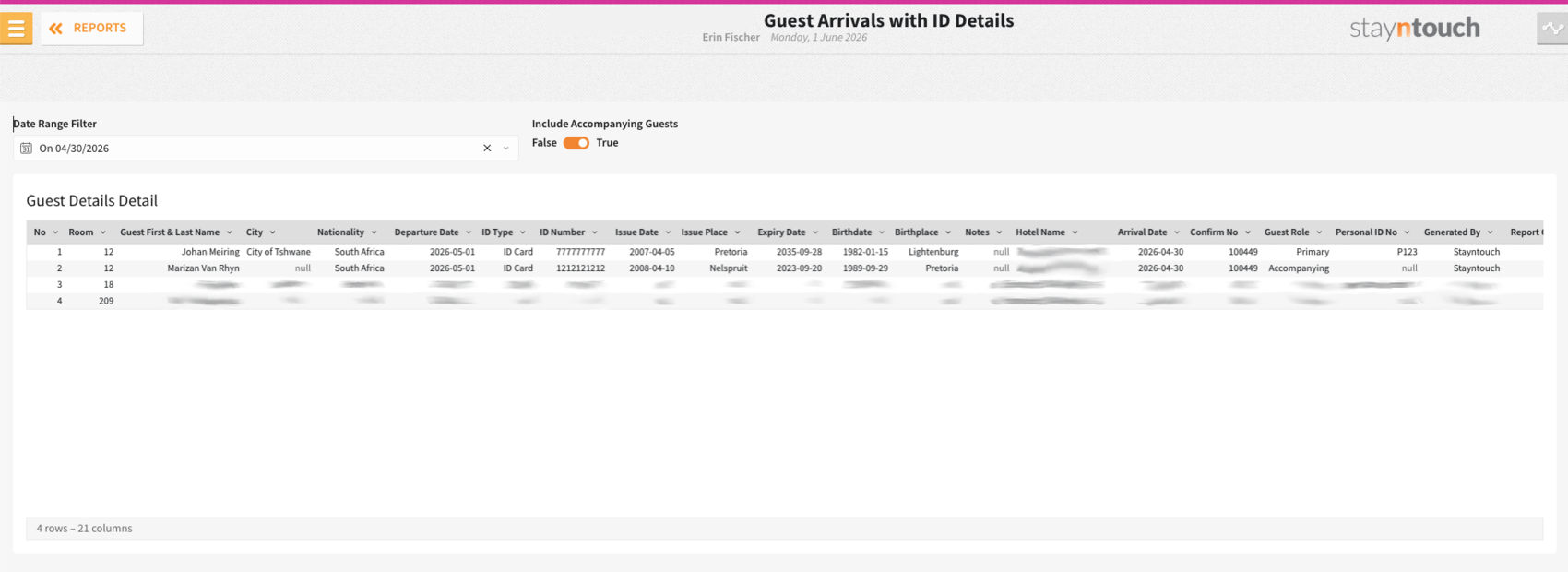
The new Guest Arrivals with ID Details Report can be generated from Reports > New Report for arrival date and will list all the arrival reservations that checked in on that date with the following information: Number, Room, Guest First & Last Name, City, Nationality, Departure Date, ID Type, ID Number, Issue Date, Issue Place, Expiry Date, Birthdate, Birthplace, and Notes.
The report can also be filtered to include accompanying guests if desired.
Custom Exports: Membership Number Support
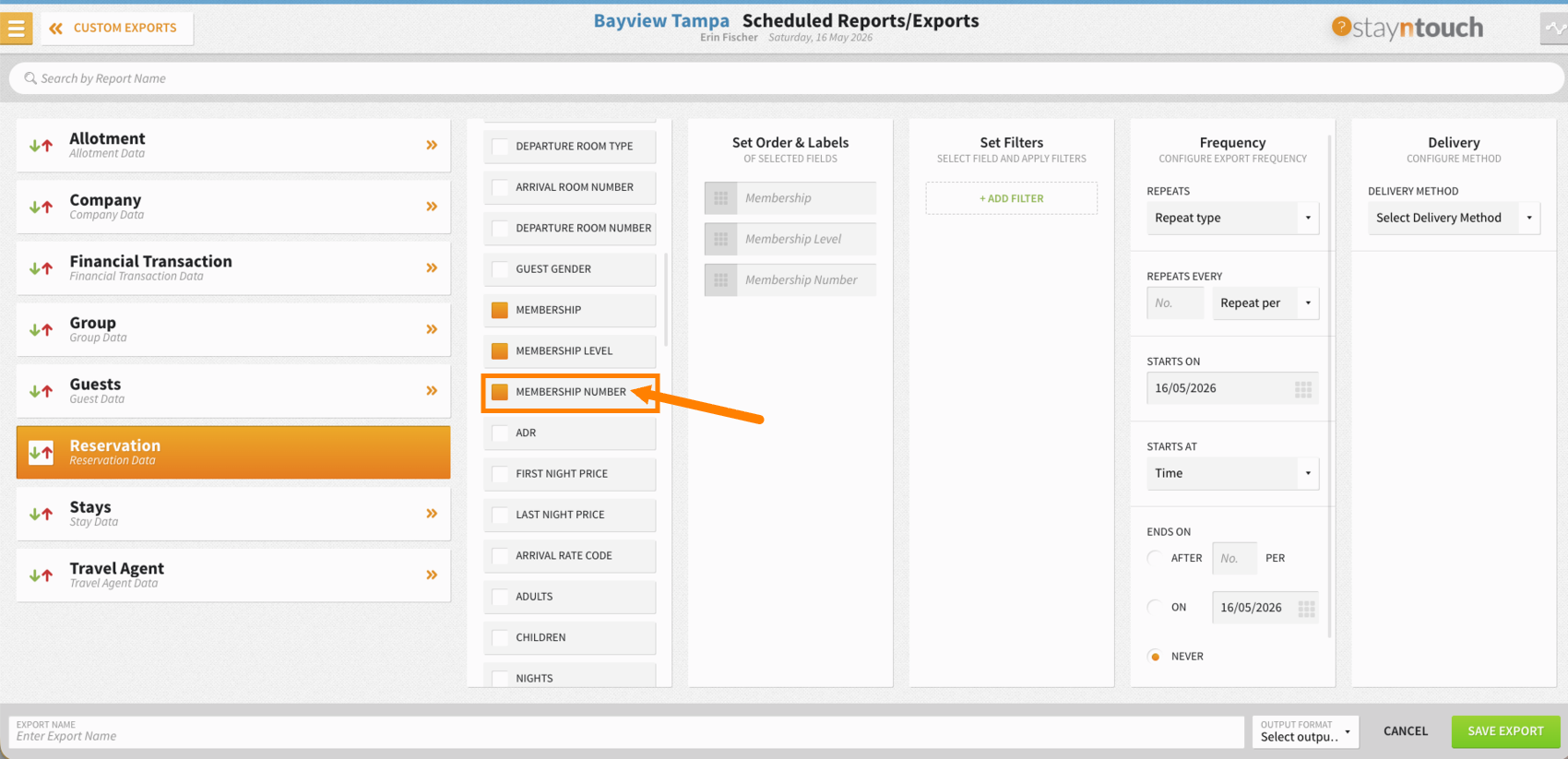
Reservation custom exports (via Reports > Schedule a Report/Export > Custom Exports > + New Export > Reservation) support Membership Number as a selectable field, export it alongside Membership and Membership Level for easy loyalty auditing. Blank when not applicable.
Stayntouch Rate Strategy
Stayntouch Rate Strategy: Split by Day
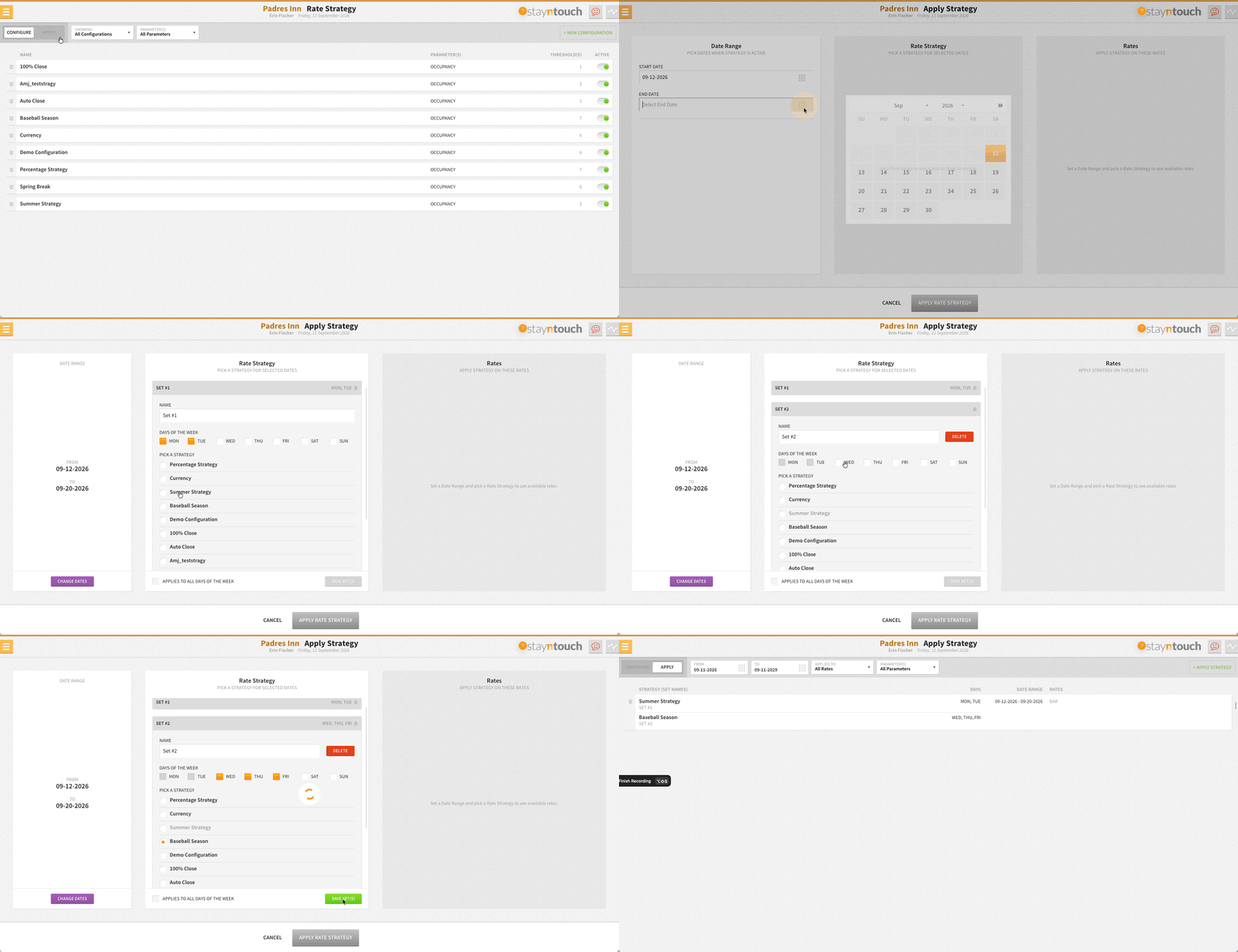
You can break a single date range into multiple day-of-week sets on the Apply screen (up to 7 per range) and pair each with its own Rate Strategy. Pick the days each set applies to, give it a name, and leave out any day that shouldn’t carry a strategy. One date range, many strategies, zero workarounds.
Multi-Property Functionality
Multi-Property Full Rate Creation Pilot: Hotel-Level Deposit & Cancellation Policy Control
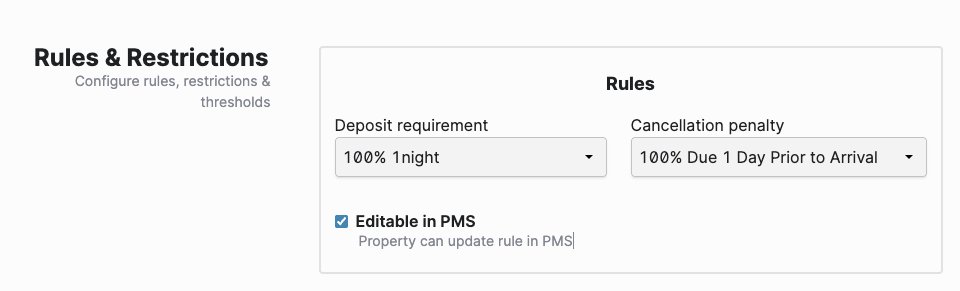
Multi-Property admin users can mark deposit and cancellation policies as Editable in PMS right from the Rules & Restrictions section during full rate creation. Once enabled, properties get the flexibility to fine-tune those policies locally, while rate merges always preserve existing policies, so nothing gets overwritten.
Multi-Property Availability/Reservations: Hotels Without Reservations or Availability Subscription Are Hidden
Hotels without an active Reservations or Availability subscription no longer appear on the Availability screen, and their reservations are excluded from search results.
Stayntouch IBE
Full Support for PMS Translations
Stayntouch IBE fully reflects PMS-configured translations.
American Territories Support in Guest Forms
Guest forms support American Territories as valid entries.
GTM: Numeric Fields for GA4 Compatibility
The IBE Booking GTM event now returns numeric duplicates of the monetary fields alongside the existing strings (transactionTotal_num, transactionTax_num at the event level, and price_num, tax_num, total_num on each product). The original string fields remain unchanged, so GA4 reporting can pick up correctly-typed numbers without breaking any existing integration built on the string values.
Stayntouch Guest Kiosk & Mobility
Digital Registration Card: Default Texts
The Digital Registration Card, used in both Stayntouch Guest Kiosk and Mobility, ships with default text content, so properties no longer need to configure it from scratch.
- Identify all text tags used by the Kiosk and Mobility Digital Registration Card flows.
- For each text tag, if a translation is not configured for the property's selected language, automatically fall back to a predefined default text instead of displaying the translation key.
- This ensures a consistent user experience and prevents UI/design issues when translations are missing.
Digital Registration Card Signature Button Color
The Clear Signature button on the Digital Registration Card follows the property’s secondary button color scheme, for visual consistency with the rest of the card.
Stayntouch Guest Mobility: Check-In Email Timing
The Stayntouch Guest Mobility check-in email can be set to send up to 7 days prior to arrival, instead of the previous fixed window.
Stayntouch Guest Kiosk: Quick Fill Sync During Check-In
Quick Fill travels with the Registration Card. When a PMS user selects Quick Fill and sends the card to the kiosk, the guest sees only mandatory fields by default, no extra step needed. Guests can still deselect Quick Fill at the kiosk to fill in optional details, and cards sent without Quick Fill behave exactly as before.
Payment Link Management (In Pilot)
This release introduces Payment Link Management, covering the full guest journey from booking through check-out and cancellation.
This feature is currently in pilot. Please contact sales@stayntouch.com if you’re interested in piloting it. Here’s what's new:
Centralized Payment Link Management
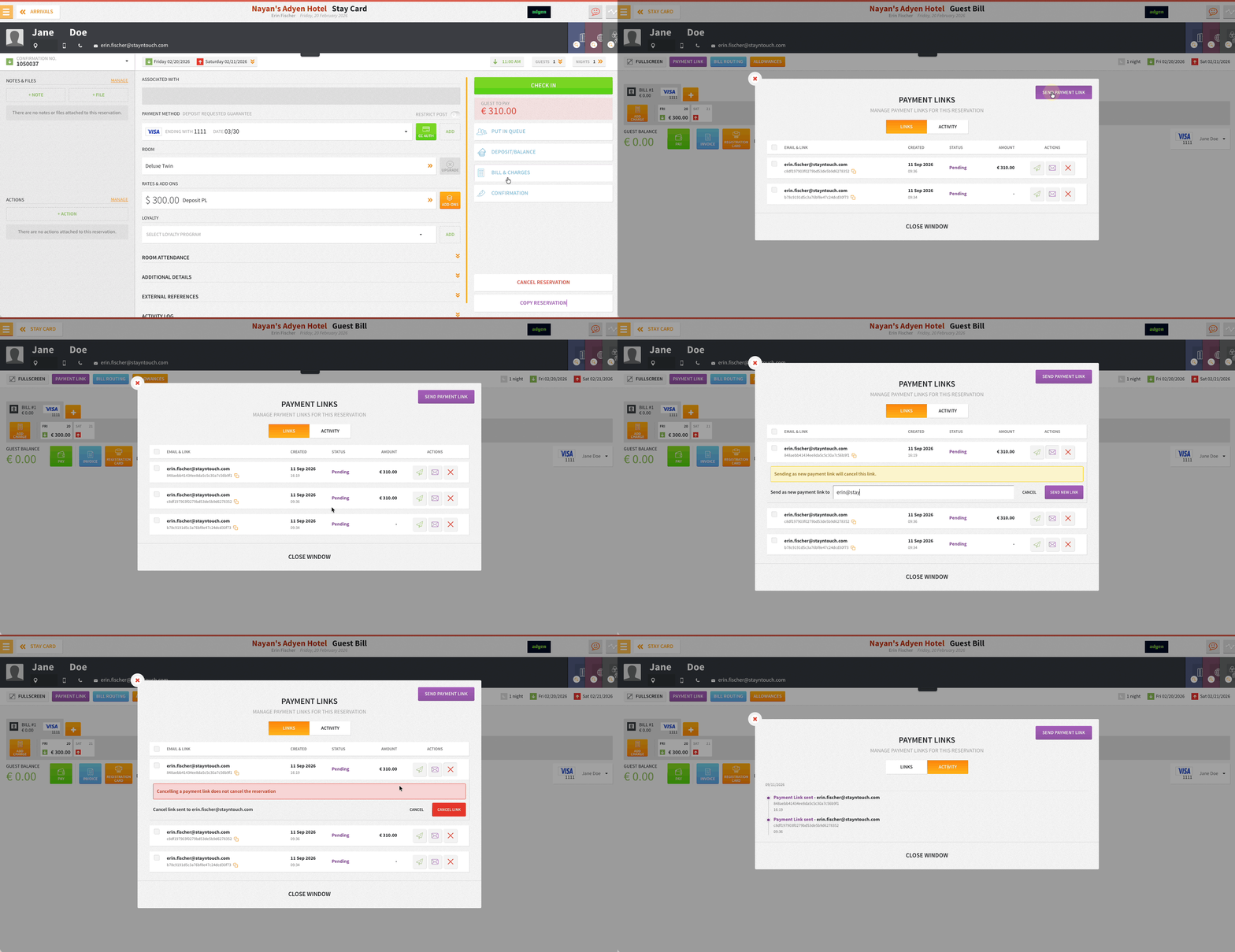
Resend, cancel, or multi-select payment links right from the Guest Bill or Front Desk > Accounts.
Full Visibility with the Activity Tab
Every send, resend, and cancellation is logged in a single, date-grouped Activity tab on reservations and accounts, giving you a clean audit trail at a glance.
Automated Deposit Collection
Payment links for deposit requests can auto-send based on your existing deposit rules, cutting manual follow-up. This requires separate activation by Stayntouch Admin.
Follows the Guest, Even After Check-Out
Generate a brand-new payment link on a closed house or group account, and manage links directly on cancelled reservations. Charges stay blocked as expected, only collection stays open.
More Control Over Every Link
Choose exactly who receives a link, set a custom expiry timeframe, and opt in to receive a copy of every payment confirmation with the new Hotel In Copy toggle.
Stationery Templates for Every Step
Five configurable stationery templates cover deposit requests, payment confirmations, custom link emails for accounts and reservations, and expiry reminders, keeping every guest touchpoint consistent.
You can learn more about Payment Link Management here.
Integrations
Selected Sync for CRS & Channel Managers
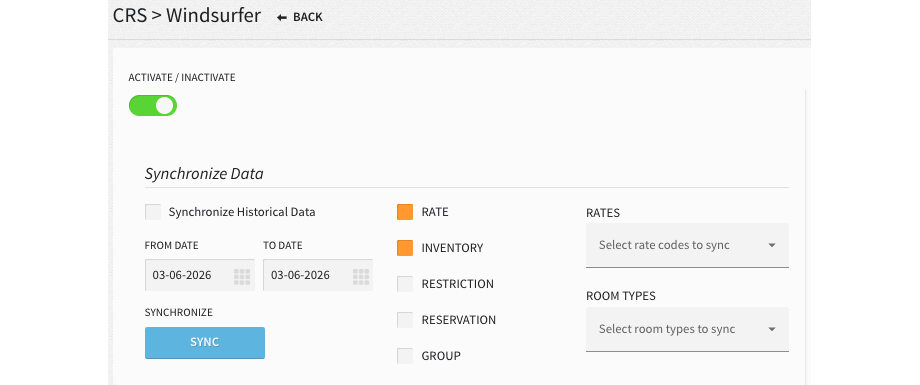
We’ve introduced new filters on the CRS sync screen to reduce outbound traffic and speed up updates to external systems. Instead of always sending everything, users can select specific rate codes for rate syncs, or specific room types for inventory syncs, so a single affected item can be resynced without resending the rest. This is available across all 10 supported CRS/Channel Manager integrations: SynXis, Windsurfer, TravelClick, Pegasus, Inntopia, RateTiger, SiteMinder, D-Edge, Cubilis, Stayntouch Channel Manager (Channex), and STAAH.
Selection is required: at least one rate code for rate syncs, at least one room type for inventory syncs, otherwise an error displays. Since the list only shows rate codes already set up under Settings > Rates > Channel Manager, a missing rate code becomes immediately obvious.
The existing 180-minute restriction between syncs still applies to resyncing the same rate code or room type, but no longer blocks syncing different rate codes or room types within that window.
D-Edge A2021 Enhancements
Enhancements have been made to the D-Edge A2021 integration.
New Connect API Partners
The following new partners are available globally. Contact your Client Success Manager or Customer Support for more information.
The Mini Bar App | Minibar
Aphy | Operations AI
For Developers
Connect APIs: New GET Endpoint to Calculate Add-On Pricing
A new GET /hotels/{id}/addons_cost_calculations endpoint calculates pricing for one or more add-ons, including all applicable taxes, tourist tax, and service fees, for a given date range and guest count. It is used in the workflow for separately purchased add-ons, not add-to-rate add-ons. The response returns a per-add-on daily breakdown plus an add-on total and a grand total, so partners can display accurate add-on costs to guests without performing their own tax calculations client-side.
Connect APIs: Return Category Type and Active Status in GET /hotels/{id}/likes
GET /hotels/{id}/likes now returns active and type fields per like entry, so integrators can see which like categories are active for a property and how many likes can be submitted per category (single-select radio or dropdown, or multi-select checkbox) before calling POST /guests/{id}/likes.
Connect APIs: New Endpoint POST /groups/{id}/custom_group_restrictions
A new POST /groups/{id}/custom_group_restrictions endpoint lets partners set custom group rate restrictions, closed to arrival or minimum length of stay, across specific dates and room types, in a single request.