
Stayntouch PMS
Release Notes (v6.06)
Effective:
- 28 April 2026 (6am EST) for customers using https://app.us1.stayntouch.com/
- 30 April 2026 (3pm EST) for customers using https://app.eu1.stayntouch.com/
- 5 May 2026 (6am EST) for customers using https://app.us2.stayntouch.com/
TABLE OF CONTENTS
- Hotel & Staff Updates: User Setup Menu Reorganization
- Room Diary: Room Moves Across Different Room Types
- Guest Card Merge: Cross-Property Reservation Warning
- Action Manager: Preconfigured Actions
- Financial Transactions Summary Report: PDF Format For Scheduled Reports
- Stayntouch IBE
- Integrations
- For Developers

- Front desk agents can move reservations to any available room type directly from the Room Diary.
- Rate add-ons and extras are filtered by the guest’s selected dates and rate, so only applicable options are displayed during booking.
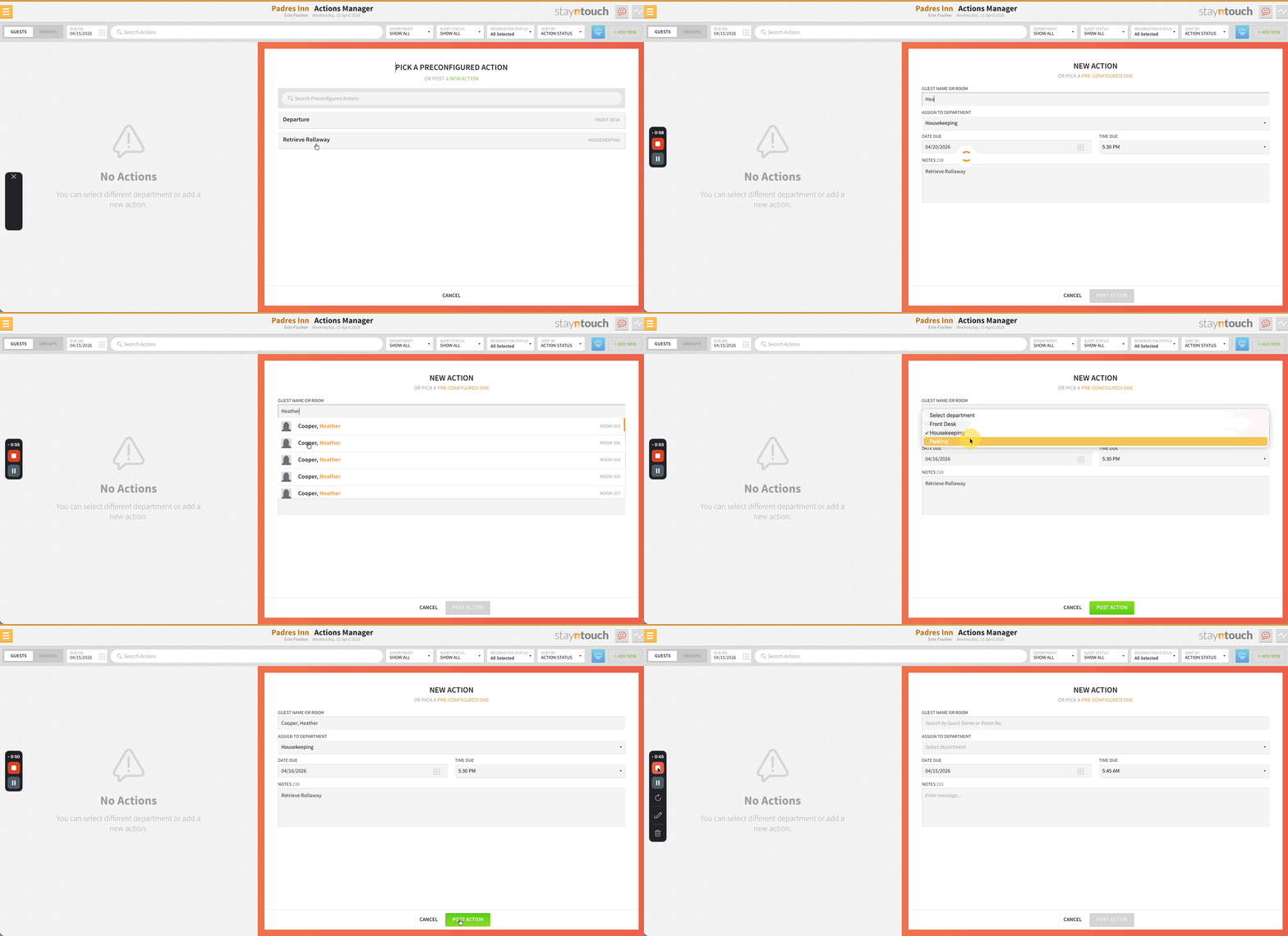
- Preconfigured action templates are available in the Action Manager, with key fields auto-filled on selection.
Hotel & Staff Updates: User Setup Menu Reorganization
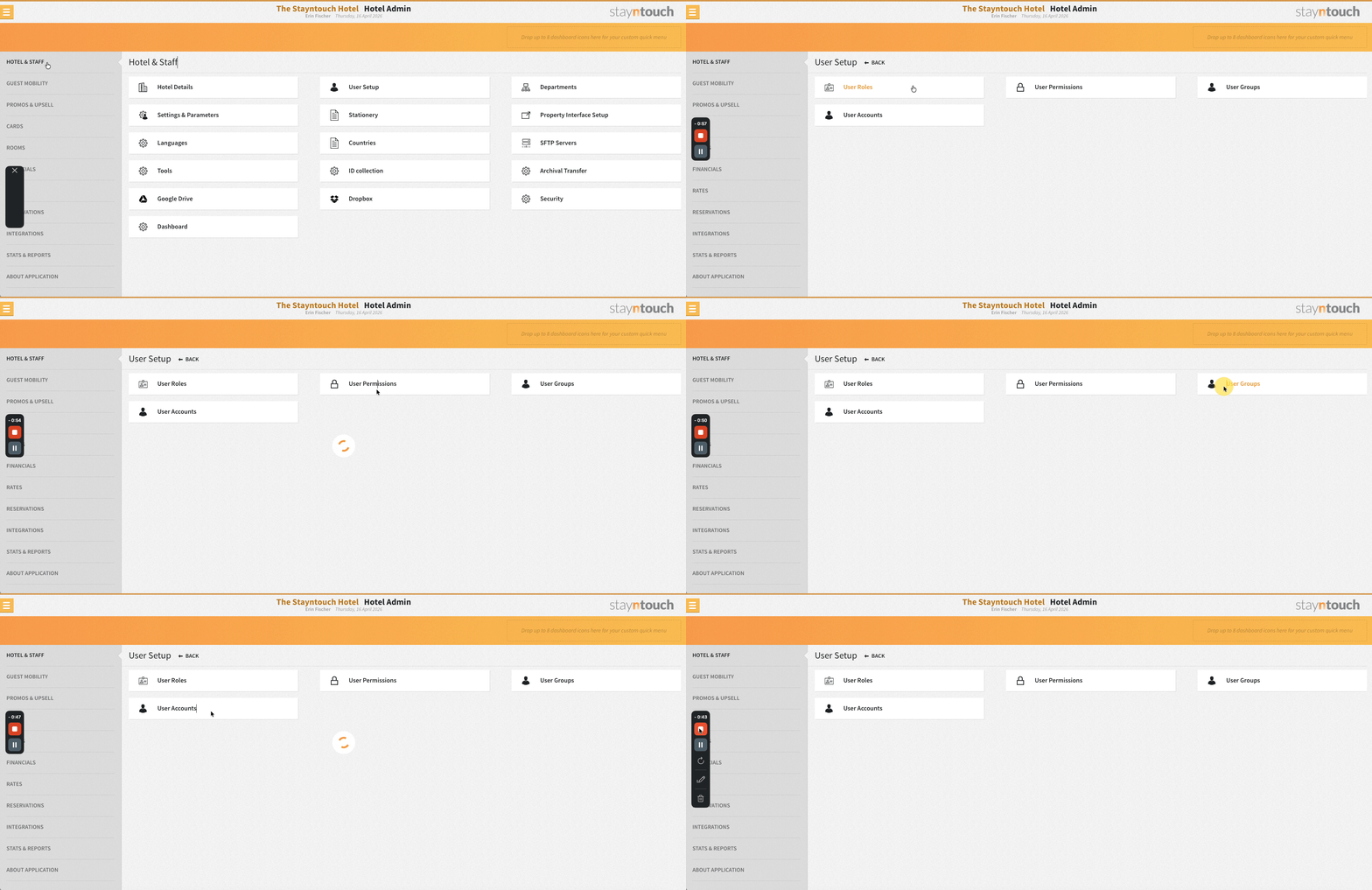
The Settings > Hotel & Staff section has been reorganized. User Setup, User Groups, and Permissions have been removed from the main menu and consolidated under a new User Setup section with the following structure:
- User Accounts (formerly User Setup)
- User Groups
- User Roles
- User Permissions (formerly Permissions)
Room Diary: Room Moves Across Different Room Types
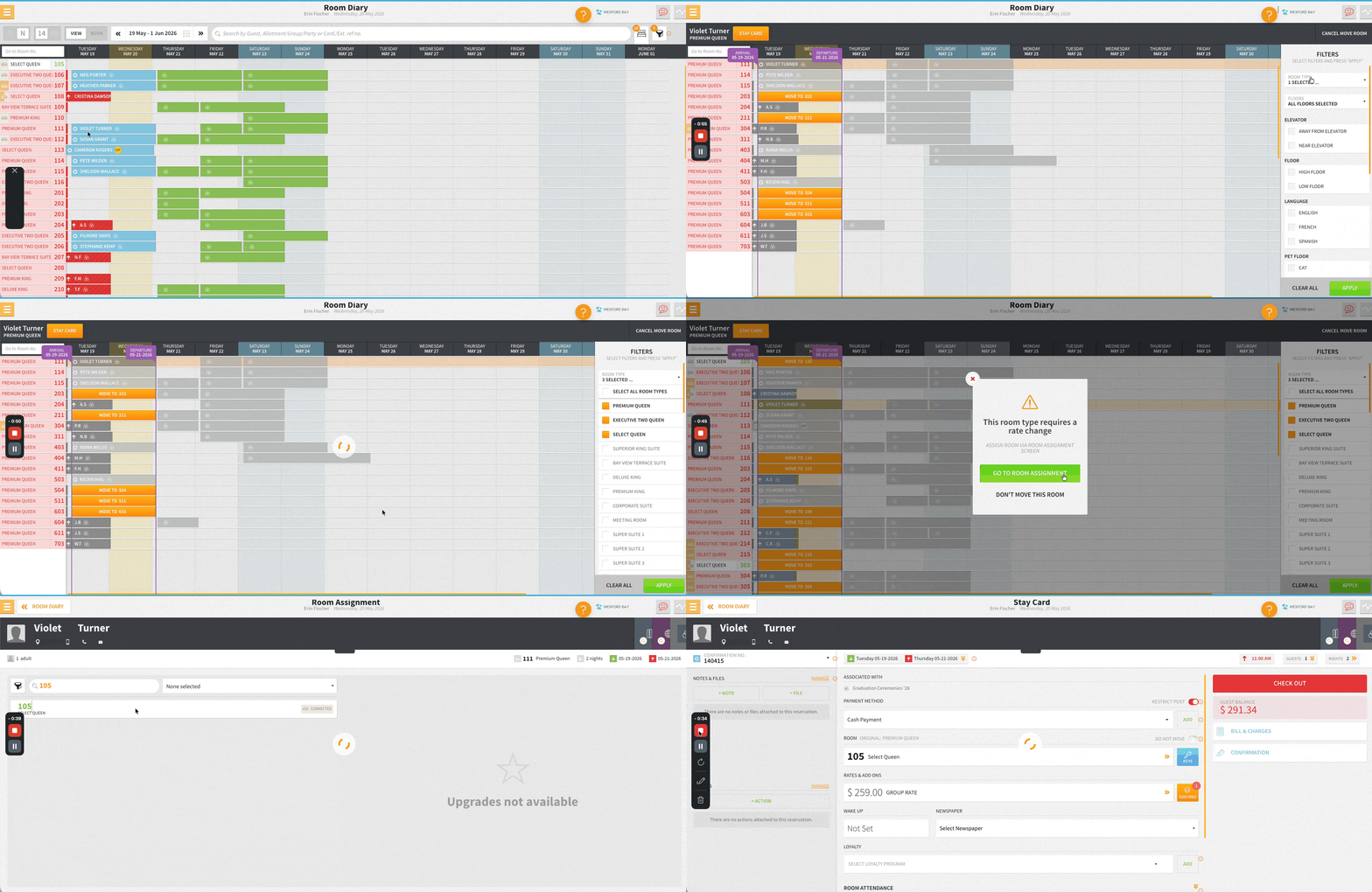
Front desk agents can move reservations to any available room type directly from the Room Diary. If the rate for the new room type matches the current rate, the move is applied immediately. If the rate differs, the agent is redirected to the Rooms & Rates screen within the stay card to confirm the change. Filters and overbooking visibility have also been improved to support faster room assignment decisions.
Guest Card Merge: Cross-Property Reservation Warning
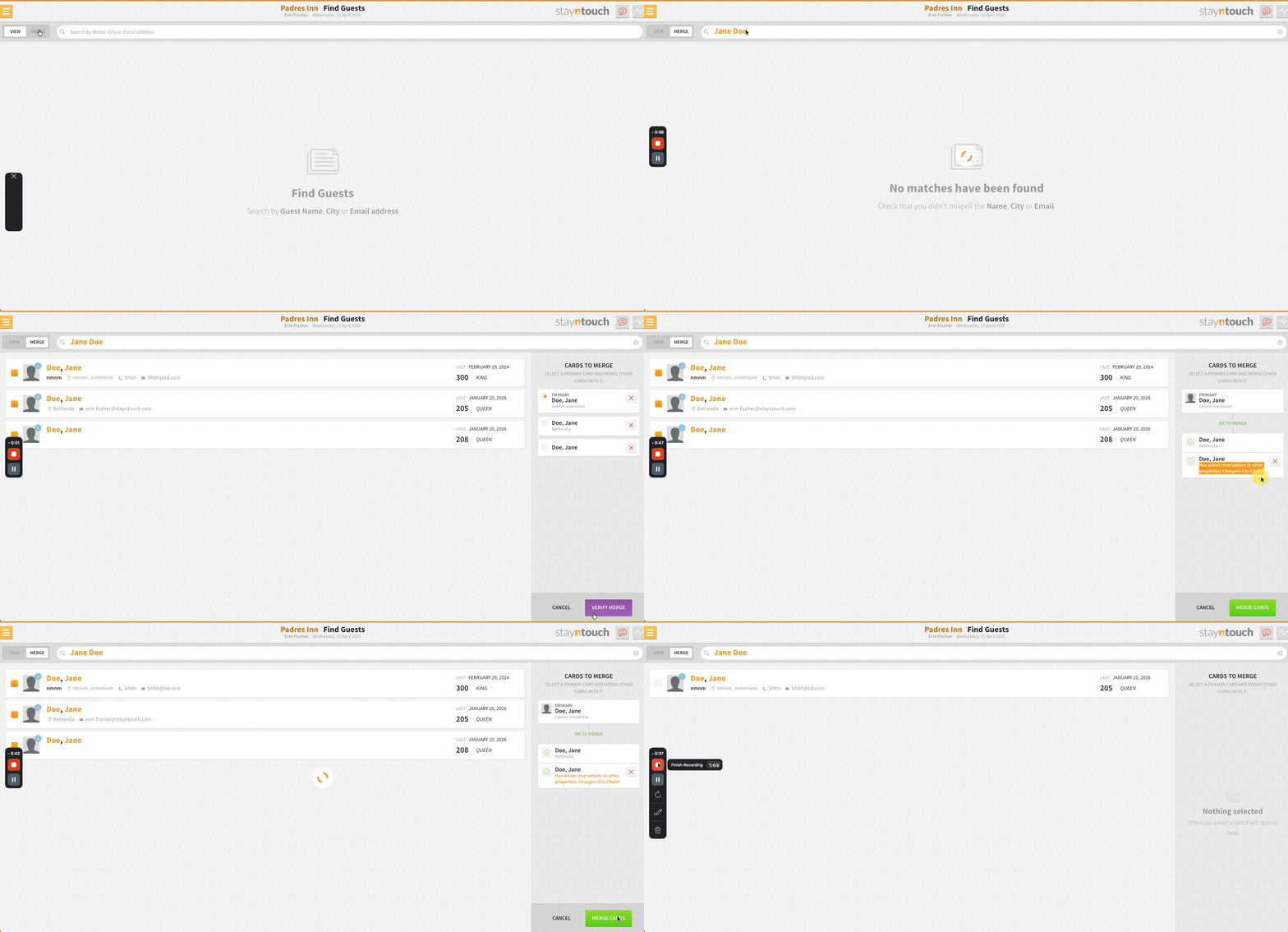
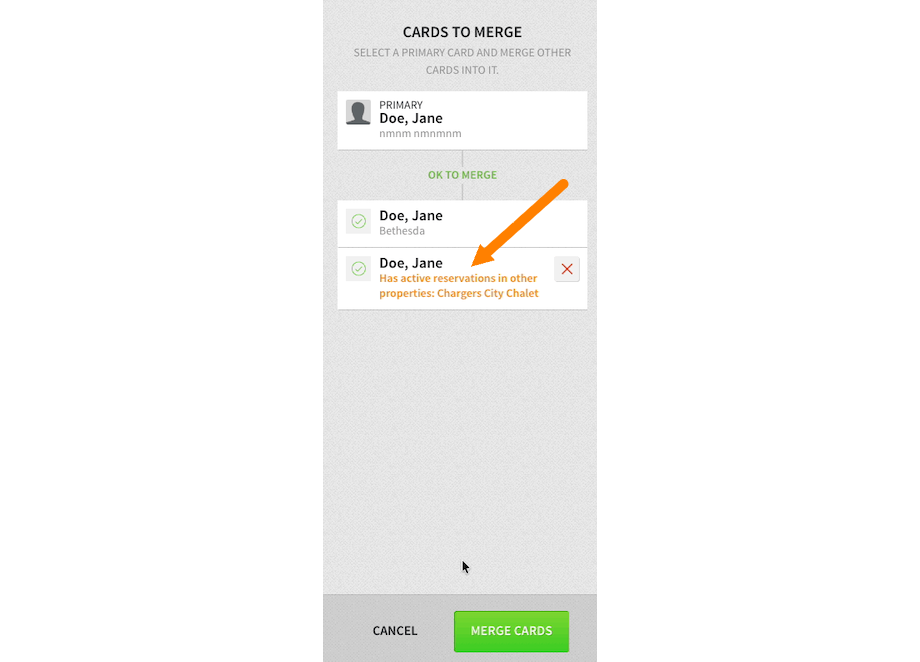
When merging guest cards, a warning is displayed if any secondary guest card has current or future reservations at other properties within the chain. The warning lists up to three affected properties (or “4 or more” where applicable), giving users the opportunity to review and exclude those guest cards from the merge before proceeding.
This safeguard is intended to prevent accidental reassignment of reservations. For example, two profiles may share the same name but belong to different guests. Merging them would move all reservations from the secondary profile to the primary, potentially resulting in inaccurate records.
Action Manager: Preconfigured Actions
A new Preconfigured Action option is available in the Actions Manager, allowing users to browse, search, and select ready-made action templates. Selecting a template auto-fills fields such as department, due date, and notes. Guest and group selections are retained or updated automatically, and all details remain editable before saving.
Financial Transactions Summary Report: PDF Format For Scheduled Reports
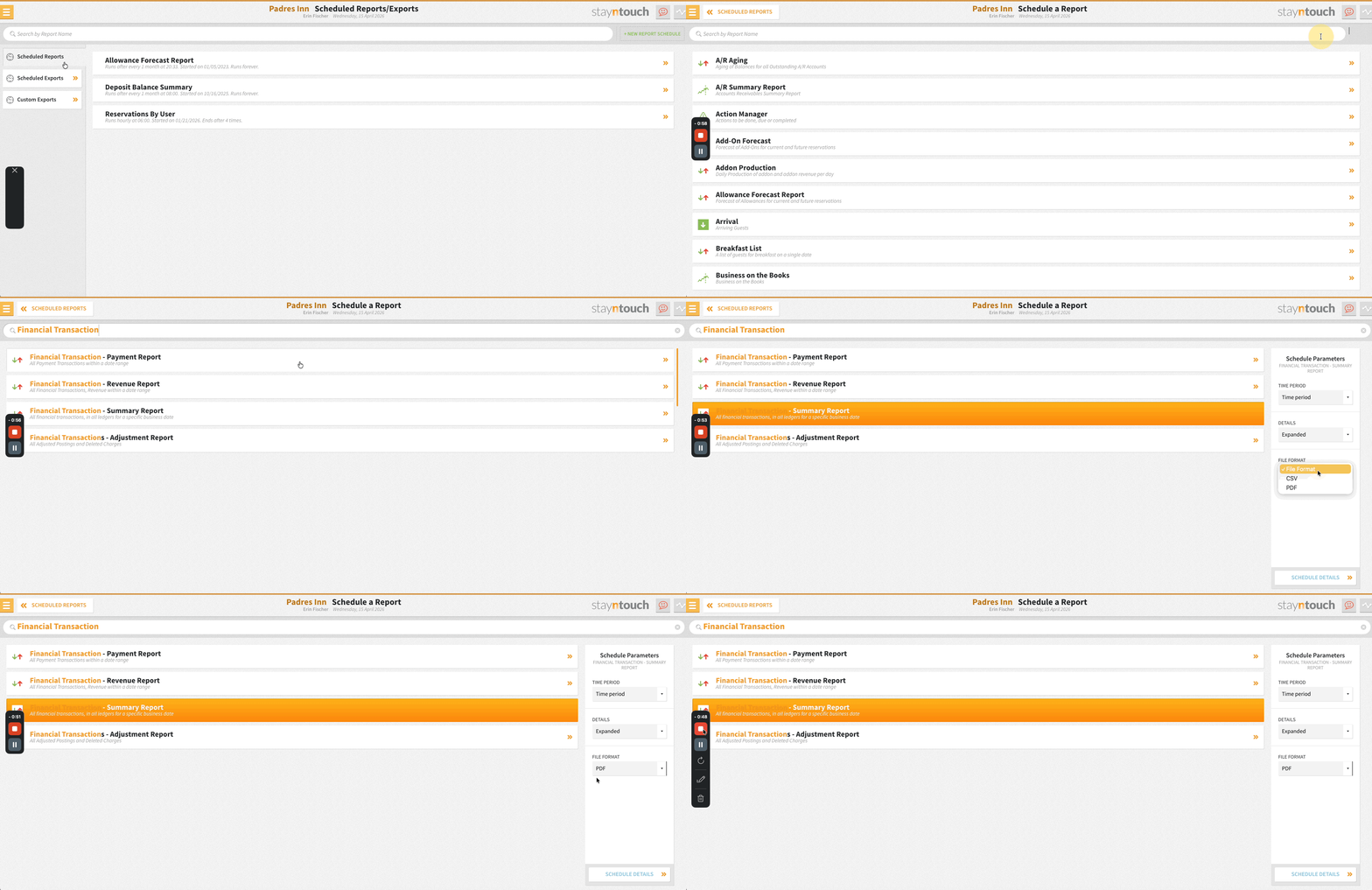
PDF format is available as an option for the Financial Transactions Summary Report when configuring scheduled reports. Reports delivered in PDF match the existing inbox PDF format and can be sent to both email and Google Drive. The data and columns are identical to the CSV version.
Stayntouch IBE
Stayntouch IBE: Filter Rate Add-Ons By Booking Date Validity
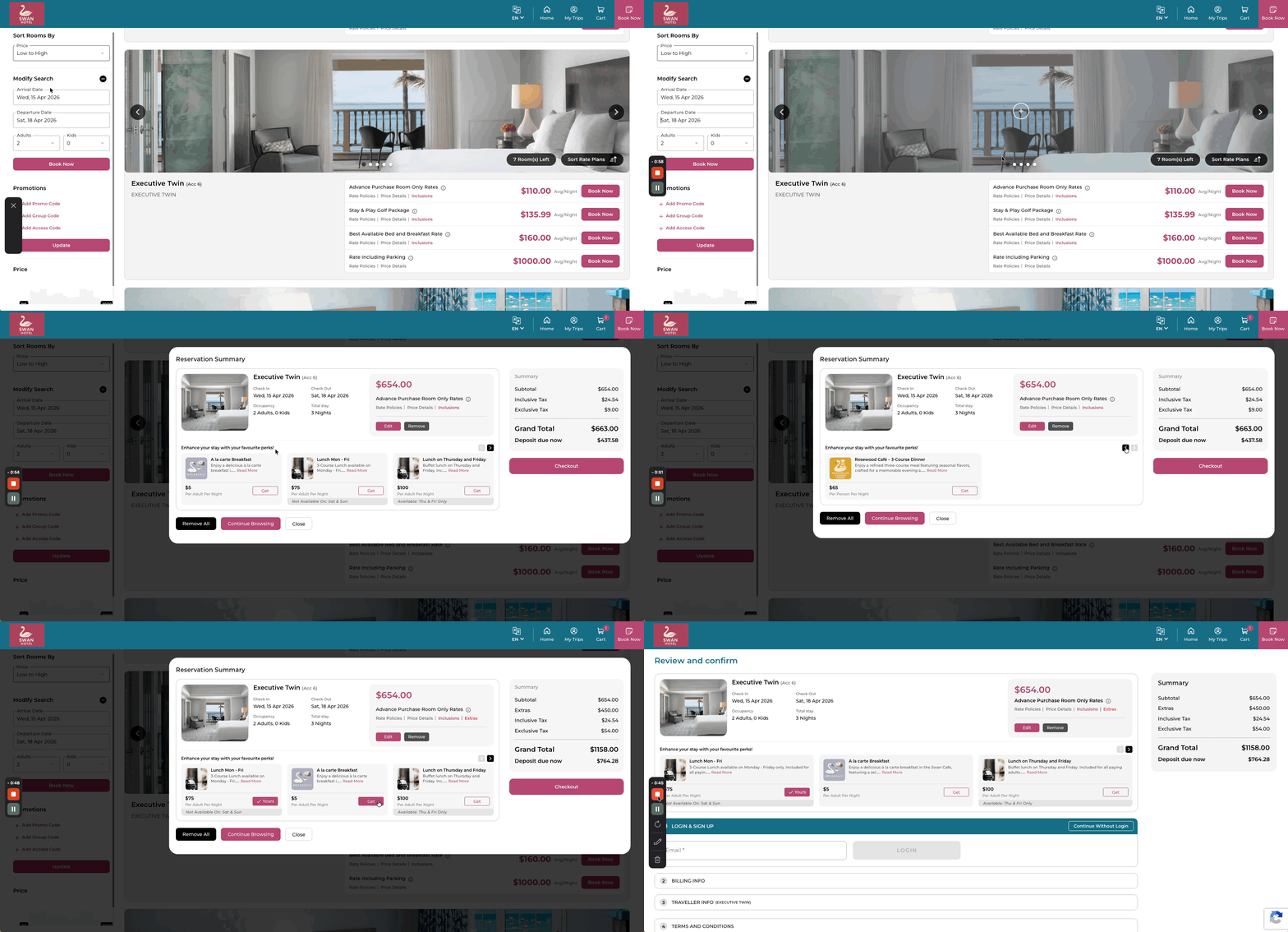
Rate add-ons display only when they overlap with the guest’s selected stay dates. Both included and add-to-rate add-ons are filtered by day-of-week availability, so only applicable options appear. This aligns with PMS reservation behavior for a consistent booking experience.
Stayntouch IBE: Extras Filtered By Rate Compatibility
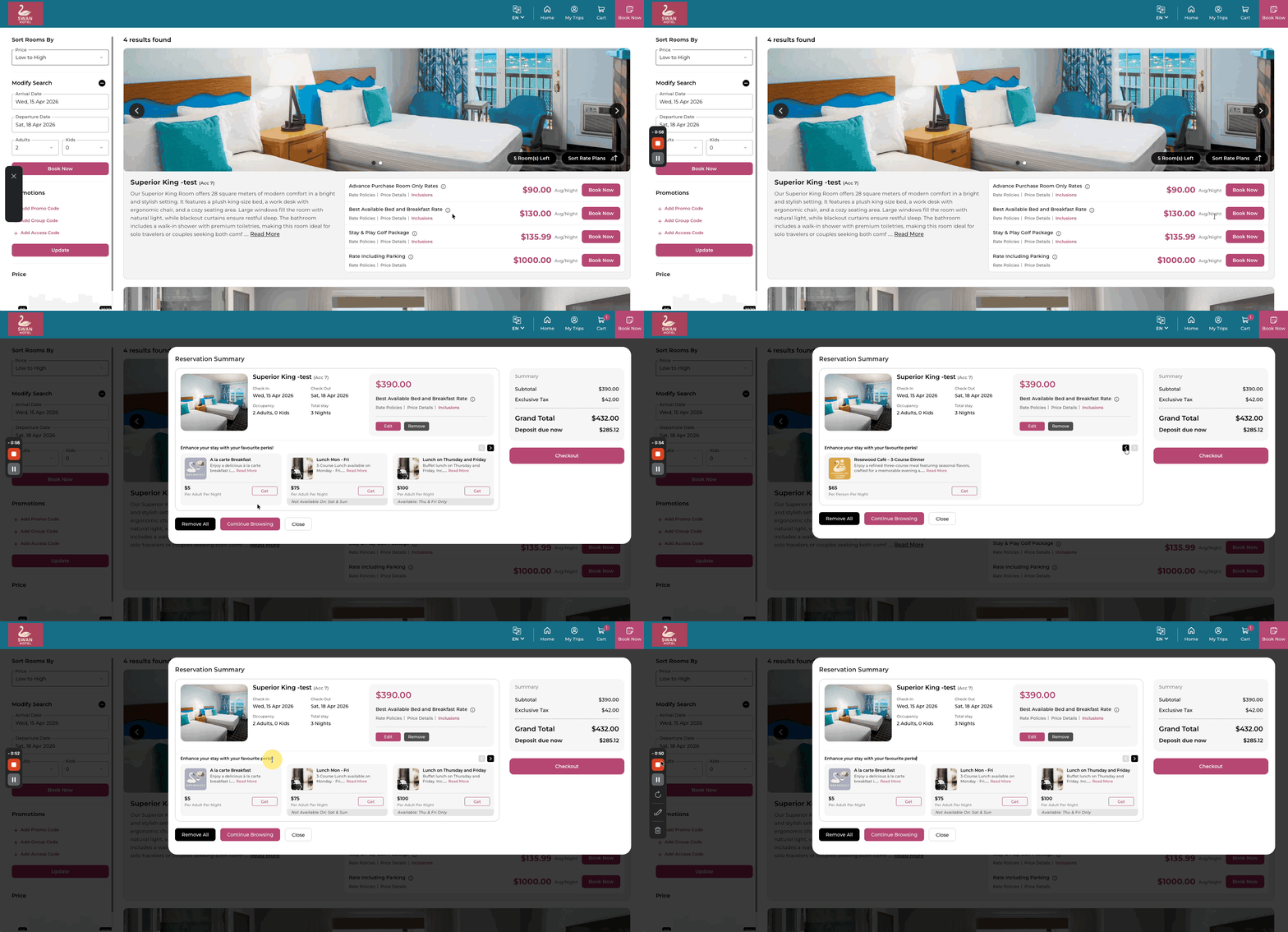
Extras are filtered based on the selected rate. Add-ons configured with rate exclusions are hidden when the guest’s chosen rate matches an exclusion, preventing invalid purchase options from appearing during booking.
Stayntouch IBE: Payment iFrame Preloaded After Guest Billing Step
The payment gateway iFrame is preloaded in the background before the guest reaches the payment step, reducing wait time. There are no changes to existing payment logic.
Stayntouch IBE: 120-Second Delay For PMS Confirmation Letter After Reservation Create/Update
For hotels using the PMS confirmation letter with Instant Payment deposit rules, a 120-second delay has been introduced for the POST /reservations/{id}/confirm_letter call following reservation creation or update via Stayntouch IBE. This allows the PMS sufficient time to record the deposit charge before the letter is sent, ensuring the confirmation reflects the correct deposit amount. Hotels using the IBE confirmation letter will continue to receive confirmation letters as normal.
Integrations
iHotelier: Improved Handling Of Cancelled & Reinstated Reservation
Once a reservation is cancelled, it is treated as final. Key changes include the following items:
- No further Modify messages are sent to iHotelier after cancellation
- Reinstatements made internally in the PMS do not trigger a Modify message
- The system sends an inventory adjustment instead to keep availability accurate
- Any reservation with a recorded cancellation number is excluded from future updates
New Integration Partners
Stayntouch PMS integrates with the following new partners, all available globally. For more information, contact your Client Success Manager or Customer Support.
- EHVA.ai | IBE
- TrustYou CDP | CDP
- Dextr AI | IBE
- Ampliphi | RMS
- Sadie AI | IBE/AI
Bug Fixes
IPC Reservation Creation Failing For Guests Without A Default Address
IPC reservation creation was failing for existing guests with no primary address on file. A default address is created automatically when one is missing, allowing reservation processing to complete.
Windsurfer Reservation Import Failing For Group Bookings With Add-Ons
Windsurfer reservation import processes correctly for group bookings, both with and without add-ons.
TravelClick Worker Threads Blocking During Vendor Slowdowns
Configurable network timeouts have been introduced for TravelClick requests. Previously, the Savon client used a 60-second default read timeout, which caused worker threads to block during vendor delays. Read timeout is set explicitly to 10 seconds by default, reducing thread blocking during TravelClick outages and improving system stability under load. No changes to retry behavior or business logic.
For Developers
Webhooks: Reservation Events Include Demographic Codes
booking_origin_code, segment_code, source_code, and market_segment_code have been added to reservation webhook events.
Affected events include create_reservation, edit_reservation, cancel_reservation, reinstate, noshow_reservation, and card_replaced. Fields return the configured code value, or an empty string if not set. Updating segmentation data on a reservation triggers edit_reservation. There are no changes to existing webhook behavior.
Webhooks: Membership Code In Guest Webhooks
membership_code has been added to create_guest and edit_guest webhook events. This returns the membership program code when available, or an empty string if not set or not configured in the PMS. Updating membership on a guest triggers edit_guest. There are no changes to existing webhook behavior.
Connect APIs: New Type Field For Posting Accounts
POST /posting_accounts accepts a new optional type parameter. House is the default and available to all. Interface is only supported when the Activate Interface Account Type toggle is enabled in Stayntouch Admin. Invalid types are rejected with 422 Unprocessable Entity.
Bug Fixes
Cancellation Policy Parity With Deposit Policies
Cancellation policies now behave consistently with deposit policies. When apply_to_all_bookings: true, cancellation policies apply automatically to all rates without an assigned cancellation policy.
Pagination Inconsistency Across Bills Endpoints
GET /bills/revenue and GET /bills/invoices_per_day were returning inconsistent default page sizes. Both endpoints now default to 25 results per page, accept per_page values from 1 to 50, and cap requests above 50 at 50 results.