
 Stayntouch PMS
 Stayntouch IBE: Extras (Separately Purchased Add-Ons)
Extras are separately purchased add-ons available via Stayntouch IBE that allow guests to enhance their booking experience by purchasing additional services or amenities at the time of booking.
Important: This documentation covers Separately Purchased Extras only, not rate add-ons (add-ons included as part of a rate setup).
For more information about features supported by Stayntouch IBE, please see this article.
TABLE OF CONTENTS
Setup Instructions
Step 1: Configure Add-Ons in PMS
- Navigate to Settings > Rates > Add-Ons.
- Select the add-on you want to sell on the IBE as a separate item.
- Enable the Online flag for the add-on.
- There is no limit to the number of extras a property can display.
- Extras in the IBE are displayed in alphabetical order.
- Add-on validity dates are supported.
Note: All add-ons with the Online flag selected will be displayed in the IBE regardless of any other flags selected, as long as they are available during the selected dates and days of the week.
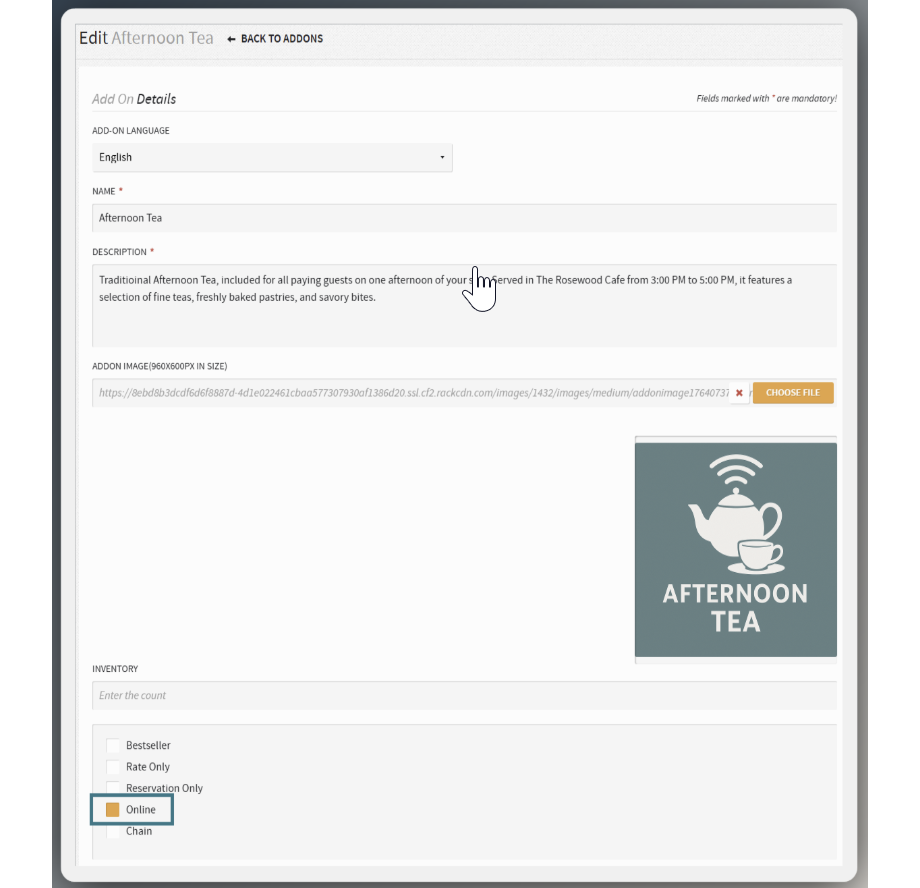
Step 2: Customize Add-On Details
Configure the following customer-facing information:
Image:
- Upload an image sized 300 × 300 pixels.
- If no image is uploaded, a default image will be used.
- Note: The default image cannot be modified.
Add-On Name & Description:
- Update the add-on name to be customer-friendly.
- Write a compelling description to sell the add-on.
- Remember: This is customer-facing content—make it appealing.
Note: Changes made in the PMS take up to 20 minutes to appear in the IBE
Step 3: Enable Extras in IBE Sitebuilder
Contact the Stayntouch Onboarding Team to turn on the Extras functionality in your IBE's Sitebuilder.
Example Configuration
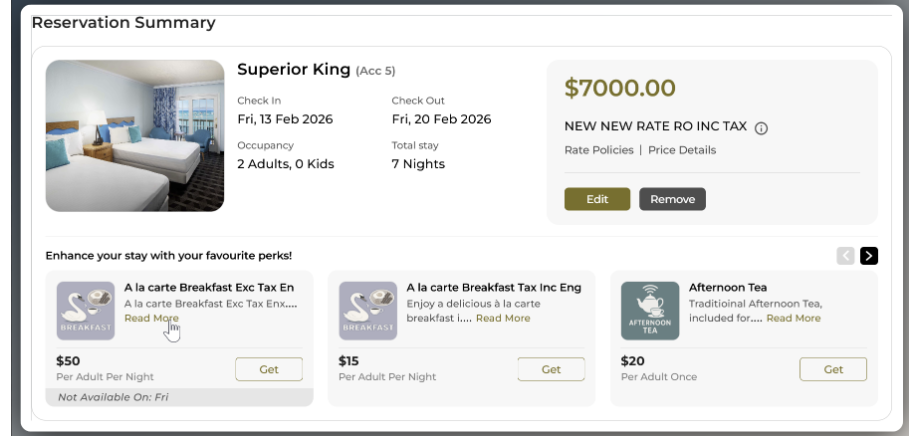
"Afternoon Tea" Add-On:
- Custom image showing tea service
- Customer-Facing Name: "Afternoon Tea" (translation reads from the PMS)
- Description: "Traditional Afternoon Tea, included for all paying guests on one afternoon of your stay. Served in The Rosewood Cafe from 3:00 PM to 5:00 PM, it features a selection of fine teas, freshly baked pastries, and savory bites." (translation reads from the PMS)
- Pricing: $20 per adult, per stay (posting type translation reads from the IBE's Sitebuilder)
- Automatically added to guest folio upon booking confirmation
IBE View:
Translations
- Dynamic content (add-on names and descriptions)—pulled from PMS
- Static labels (buttons, headings, messages), customizable through Sitebuilder translation indexes for any language or terminology preferences.
Available Translation Indexes
Pricing Display Labels
- per-adult-per-night – Per Adult Per Night
- per-child-per-night – Per Child Per Night
- per-person-per-night – Per Person Per Night
- per-room-per-night – Per Room Per Night
- per-adult-once – Per Adult Once
- per-child-once – Per Child Once
- per-person-once – Per Person Once
- per-room-once – Per Room Once
- per-adult-per-week – Per Adult Per Week
- per-child-per-week – Per Child Per Week
- per-person-per-week – Per Person Per Week
- per-room-per-week – Per Room Per Week
Main Interface Elements
- extra-addons-heading – Enhance your stay with your favorite perks!
- extra-addons-button – Extras
- extra-addons-subtotal – Extras
- addon-only-label – Only
- addon-get-label – Get
- addon-yours-label – Yours
Popup and Summary
- extra-addons-added-popup-title – Extras
- extra-addons-added-popup-total – Total
Availability Messages
- addon-available-label – Available
- addon-not-available-label – Not Available On
- addon-availability-warning – Some extras are not available for the selected dates. These extras will be removed from your reservation if you proceed.
- addon-availability – Add-On Availability
- new-addon – New Add-Ons
- removed-addon – Removed Add-Ons
Confirmation Page
- extra-addon-label-confirmation – Purchased Extras
- inclusions-label-confirmation – Inclusions
- extra-summary-label-confirmation – Extras Summary
To add/change translations in the Sitebuilder: Contact the Onboarding Team to input translations directly in the Sitebuilder for you.
How Extras Work
Rate Add-Ons vs. Separately Purchased Extras
Important: If a rate already has an add-on attached to it, and a guest selects that rate, the add-on will not be offered again in the Extras section. This prevents duplicate purchases of the same add-on and improves the guest journey.
Booking Process
Step 1: Browsing Available Extras
Guests view all available extras with images, descriptions, and pricing. Each extra displays with an Add button.
Step 2: Adding Extras to Booking
When a guest clicks to add an extra (e.g., "Afternoon Tea"):
- The button text automatically changes from Add to Yours, confirming the selection
- The Extras line item appears in the rate breakdown/pricing summary
- The Extras Total is calculated and displayed
- The Grand Total automatically recalculates to include the selected extra(s)
- All pricing updates happen in real-time without page refresh
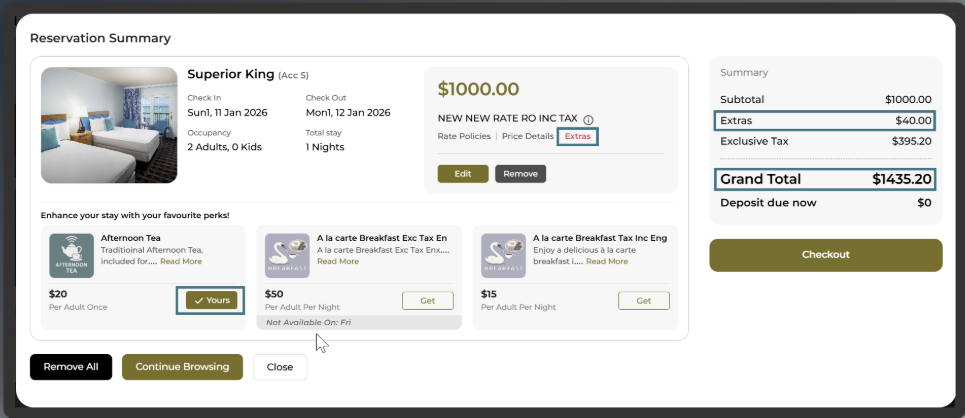
Step 3: Multiple Extras Selection
- Guests can add multiple extras to their booking
- Each selected extra appears as Yours
- The Extras Total updates dynamically as items are added or removed
- The Grand Total continuously reflects all selections
Step 4: Confirmation
- Selected extras appear in the IBE confirmation letter
- Extras are itemized separately in the booking summary
Step 5: PMS Delivery
- Add-ons are automatically delivered to the PMS as part of the booking creation
- They post to the guest folio according to the configured charge codes
Modifications
Guests can modify extras in two ways:
Option 1: My Trips (IBE)
- Guests can modify extras through the My Trips menu in the IBE
- Changes sync automatically to the PMS
Option 2: PMS
- Staff can modify extras directly in the PMS for bookings originating in Stayntouch IBE
- Changes are automatically visible in the guest's My Trips menu
Bi-directional sync ensures consistency across both systems.
Questions?
Contact the Stayntouch Onboarding Team for:
- Enabling the Extras functionality
- Sitebuilder translations
- Configuration assistance