
 Stayntouch PMS
 Dynamic Currency Conversion (DCC) for Shift4
Stayntouch now supports Dynamic Currency Conversion (DCC) for hotels that process payments through Shift4. When a guest presents a card issued in a foreign currency, the Shift4 terminal can offer to charge them in their home currency instead of the hotel's local currency. The guest sees both amounts on the terminal and chooses the one they prefer.
DCC is available for Shift4 Commerce Engine merchants in supported UK and EU countries. Please contact your CSM or Customer Support if you'd like to enable DCC for your property.
TABLE OF CONTENTS
- What Is Dynamic Currency Conversion?
- Requirements & Availability
- How DCC Works at the Terminal
- DCC Receipt Printing
- DCC in the Activity Log
- Supported Payment Flows
- Important Notes
What Is Dynamic Currency Conversion?
Dynamic Currency Conversion lets international guests pay in the currency of their own card. For example, a guest with a US-issued card staying at a hotel in the UK can pay in USD instead of GBP. They see the exact amount they'll be charged, so there are no surprises on their card statement.
Key Benefits
- Price Transparency: Guests see the final amount in their home currency before they pay
- Guest Choice: The guest decides at the terminal whether to accept or decline the conversion
- Compliance: Supports DCC requirements for Shift4 merchants in the UK and EU
- Full Audit Trail: Every DCC payment is recorded in the reservation or account Activity Log
Requirements & Availability
To use DCC, your property must:
- Process payments through Shift4 Commerce Engine (cloud commerce)
- Be located in a country where Shift4 supports DCC, including the United Kingdom and EU countries, including Austria, Belgium, Croatia, Cyprus, Estonia, Finland, France, Germany, Greece, Ireland, Italy, Latvia, Lithuania, Luxembourg, Malta, the Netherlands, Portugal, Slovakia, Slovenia, and Spain
- Have DCC turned on for your merchant account by Shift4. Contact your Shift4 representative to set this up.
- Use a supported Shift4 EMV terminal. A terminal with a built-in printer, such as the Verifone V660p, is needed to print DCC receipts.
Note: DCC is only offered for cards issued in a currency different from the hotel's local currency. Cards in the hotel's local currency go through the standard payment flow.
How DCC Works at the Terminal
DCC happens on the Shift4 terminal. Front desk staff don't need to do anything extra in Stayntouch PMS.
- Start a card-present payment or authorization in Stayntouch PMS as you normally would (for example, at check-in or check-out).
- The guest inserts or taps their card on the Shift4 terminal.
- If the card is eligible, Shift4 looks up the current exchange rate, and the terminal shows the amount in both the hotel's local currency and the guest's home currency.
- The guest chooses to pay in their home currency (accept DCC) or in the hotel's local currency (decline DCC).
- The payment completes and Stayntouch PMS records the result. If the guest accepted DCC, it's logged in the Activity Log.
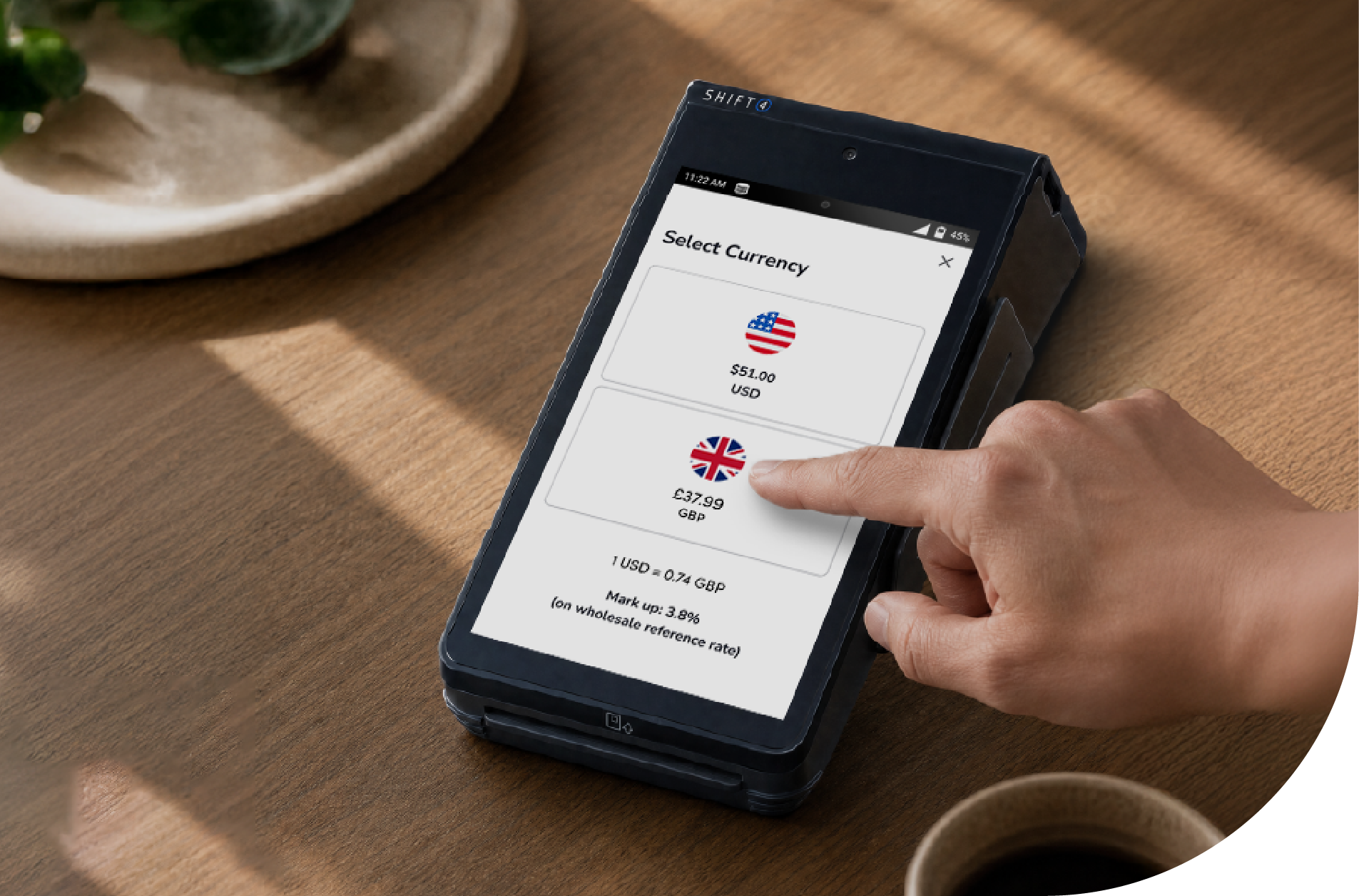
Note: The amount posted to the guest bill is always in the hotel's local currency. DCC only changes the currency charged to the guest's card. Image shown is representative—hardware and screens may differ.
DCC Receipt Printing
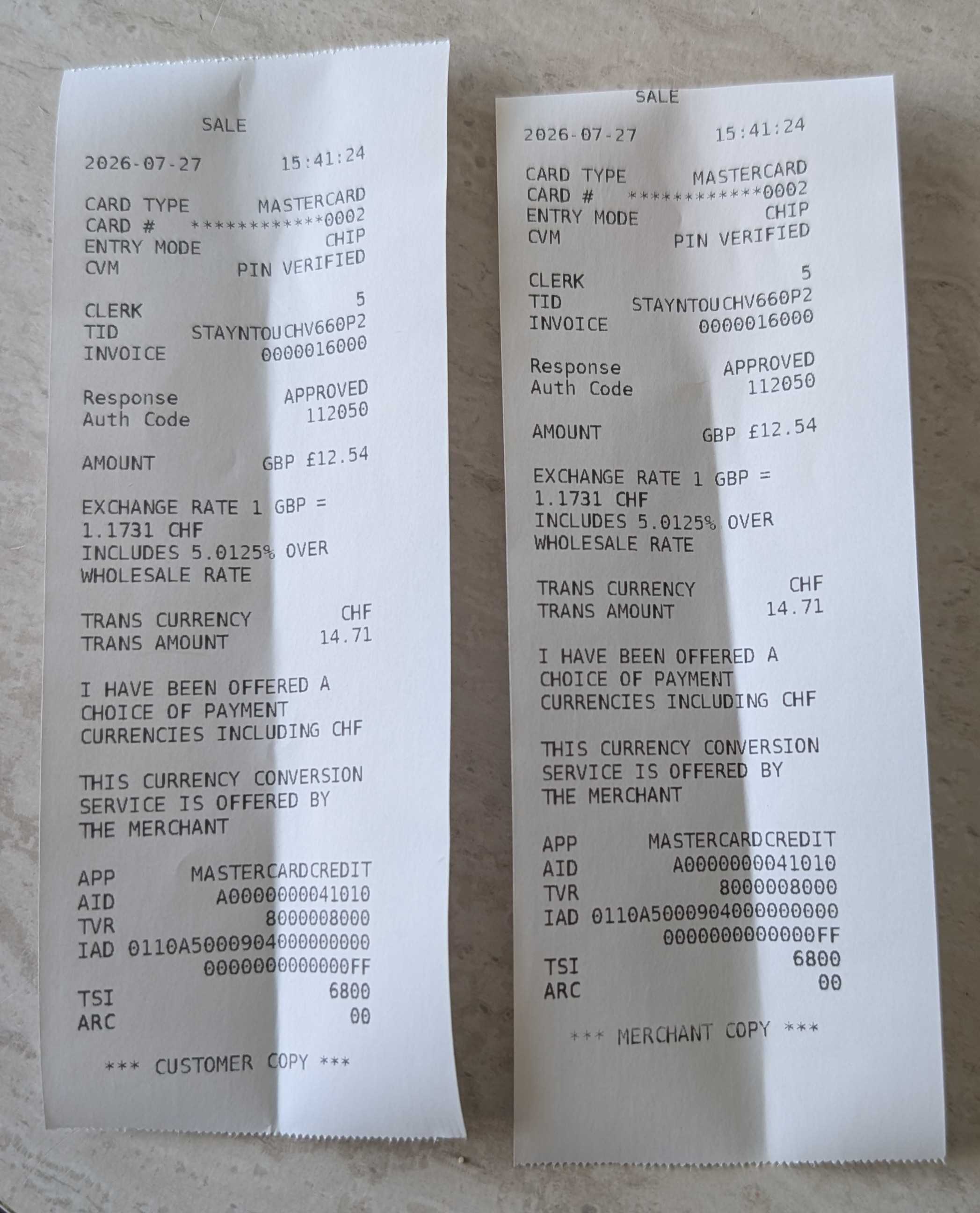
When a DCC transaction completes, Stayntouch PMS sends a print request to the Shift4 terminal. A Customer Copy and a Merchant Copy print automatically.
DCC receipts follow Shift4's receipt formatting requirements. Along with the standard card and approval details, they include:
- The amount in the hotel's local currency (e.g., AMOUNT GBP £12.54)
- The exchange rate used (e.g., EXCHANGE RATE 1 GBP = 1.1731 CHF)
- The markup over the wholesale exchange rate (e.g., INCLUDES 5.0125% OVER WHOLESALE RATE)
- The currency and amount charged to the guest (e.g., TRANS CURRENCY CHF, TRANS AMOUNT 14.71)
- The cardholder choice statement: "I have been offered a choice of payment currencies including CHF"
- The merchant disclosure: "This currency conversion service is offered by the merchant"
Setup
Receipt printing for Shift4 Commerce Engine is enabled by Stayntouch. Please contact Customer Support to enable it for your property.
Note: Once receipt printing is enabled, a receipt currently prints for every EMV transaction on the terminal, not just DCC transactions. We've asked Shift4 for an option to print receipts only when DCC is used. We'll update this article when that option is available.
DCC in the Activity Log
Every payment processed with DCC through Shift4 is recorded in the Activity Log, so your team has a clear audit trail of DCC transactions.
The entry appears as PAYMENT PROCESSED WITH DYNAMIC CURRENCY CONVERSION (DCC), with the details DCC true and the origin of the payment (for example, ROVER for the PMS, or KIOSK). It sits next to the related New Payment and Edit Reservation entries, which show the card type, last 4 digits, EMV terminal, authorization code, and amount.
Where to find it:
- Reservations: Open the reservation and go to the Activity Log
- Accounts: Go to Front Desk > Accounts, open the house or group account, and go to the Activity Log
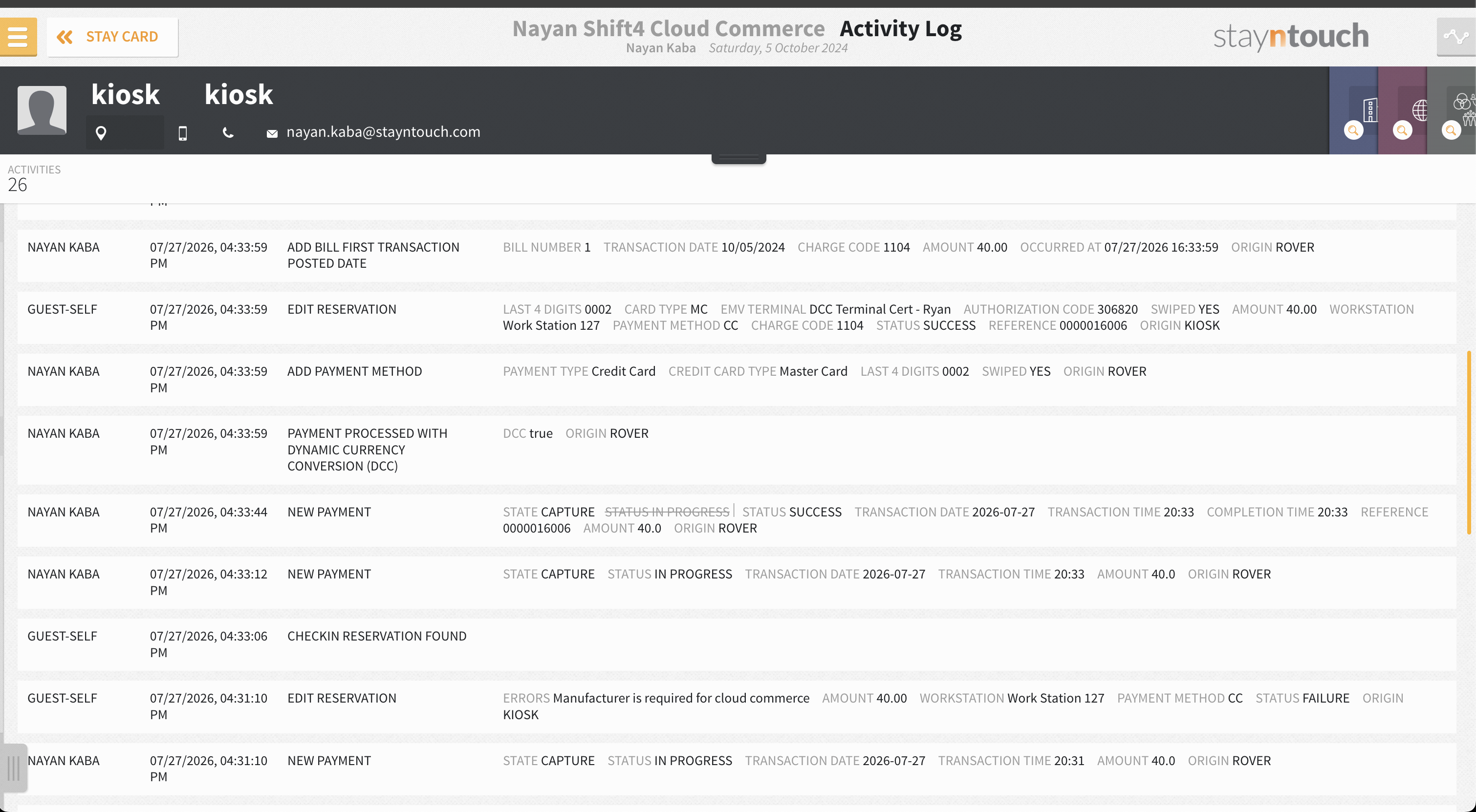
Note: A DCC entry is only created when the guest accepts DCC. Non-DCC Shift4 payments, including ones where the guest declined the conversion, don't create a DCC log entry.
Supported Payment Flows
DCC is supported across all Shift4 card-present payment flows in Stayntouch:
- Check-in (Stayntouch PMS)
- Check-out (Stayntouch PMS)
- Guest Mobility
- Guest Kiosk
- Payments on house and group accounts
Important Notes
- The DCC exchange rate and markup come from Shift4 and its DCC provider. Stayntouch doesn't set or change them.
- Folio balances, reports, and night audit stay in the hotel's local currency.
- Receipt printing for non-DCC Shift4 transactions is unchanged.
- For DCC questions about your merchant setup, exchange rates or card eligibility, contact your Shift4 representative.