
 Stayntouch PMS
 Stayntouch Chat Support
Now available in-app!
TABLE OF CONTENTS
Stayntouch Chat Support has entered the chat! PMS users can now ask questions and contact Stayntouch support directly from within the app; no need to leave the PMS to create a ticket.
Where to Find It: Just click on Settings > Stayntouch Chat Support from the menu.
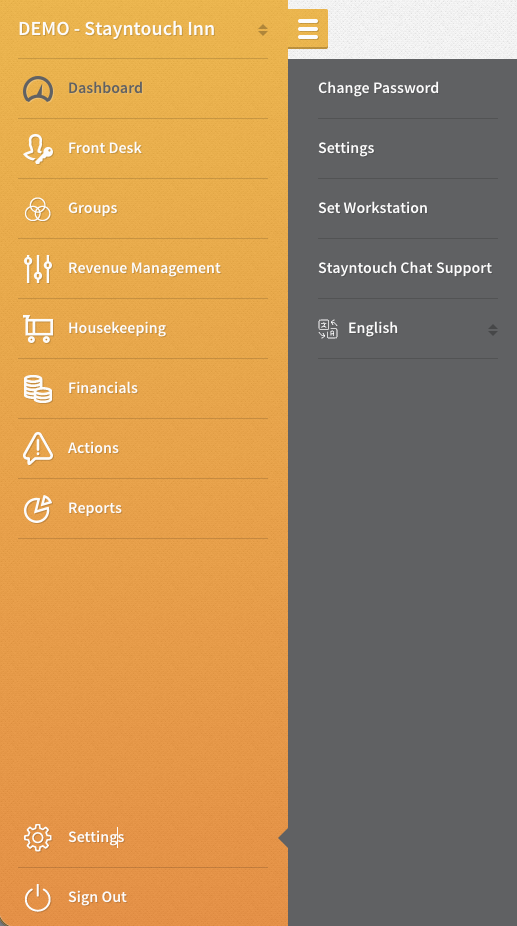
Support at Your Fingertips
Chat support gives your team direct, in-platform access to Stayntouch experts, so you can get help without leaving the PMS. This tool is now available to all our customers in-app as an additional line of support.
- Instant Automated Assistance: Start a chat anytime (available 24/7) to get quick answers driven by our Knowledge Base assistant.
- Seamless Live Agent Handoff: If the automated assistant cannot fully answer your question, you will be automatically routed to a live Stayntouch support expert (available 7:00 AM – 7:00 PM EST).
- 24/7 Coverage & After-Hours Support: Outside of live agent hours, any question that requires extra care automatically creates a support ticket for our team to follow up first thing.
- In-Platform Convenience: Support is available right in the platform your team already uses every day.
How to Chat with Stayntouch?
To chat via our in-app chatbot, simply log into the PMS (https://app.us1.stayntouch.com/login, https://app.us2.stayntouch.com/login, https://app.eu1.stayntouch.com/login), open the menu, navigate to Settings > Stayntouch Chat Support, and follow the steps outlined below:
- Ask Specific Questions: Since our chatbot draws from the Knowledge Base, ask questions about how to perform an action in the PMS (check in a guest, create a reservation, access reports, update room status, etc.), where/how to edit configuration settings, supported integrations, and so on.
- Type of Answers the Chatbot Can Surface: The chatbot pulls from our extensive Knowledge Base, so it can pull answers relating to supported features, common actions completed in the PMS, certified vendor partners, new releases, and more.
- When to Wait for an Agent: If you need to activate a paid-for feature, schedule an integration with a vendor, are experiencing a problem with the PMS, or have a hotel-specific question that is likely not documented in our Knowledge Base, we recommend waiting for an agent.
- How to Speak with an Agent: If the answers provided by the chatbot don't answer your questions, simply click the thumbs-down button following the chatbot response, and the chatbot will open a ticket for you. An agent will follow up within the hour to get you the answer you need.
FAQs
1. Can I chat with Stayntouch after hours?
- You can chat with the chatbot 24/7; however, live agents are available between the hours of 7:00 AM–7:00 PM EST. If you have a question that requires an agent response outside of those hours, click the thumbs-down button following the chatbot response, and the chatbot will open a ticket for you. An agent will follow up within the hour to get you the answer you need.
2. Will I be able to see a historic view of all of my chat questions?
- Yes, when you open the chat window, you'll be able to see all of your past conversations.
Chat Etiquette
If you've acquired the answer you need, please type "Thanks," so we can close out the chat.