
 Stayntouch PMS
[IN PILOT] Payment Link For Deposit Requests
Payment links for deposit requests allow properties to automatically collect deposits by sending guests a secure payment link via email. The link is generated based on existing deposit rules and sent directly to the guest email on the reservation, reducing manual follow-up and improving conversion.
✈️ Pilot Feature: This functionality must be enabled by our Customer Support team. If you'd like to participate in the pilot, please contact Customer Support.
Key Benefits
- Automates deposit collection via secure payment links
- Works with existing rate and reservation deposit rules
- No dependency on automatic card charging
- Full tracking, reporting, and audit visibility
Setup
Under Settings > Financials > Financial Settings > Auto Charge, you’ll find a new Collect deposit via payment link option. When enabled, the PMS will generate and email a payment link to the guest.
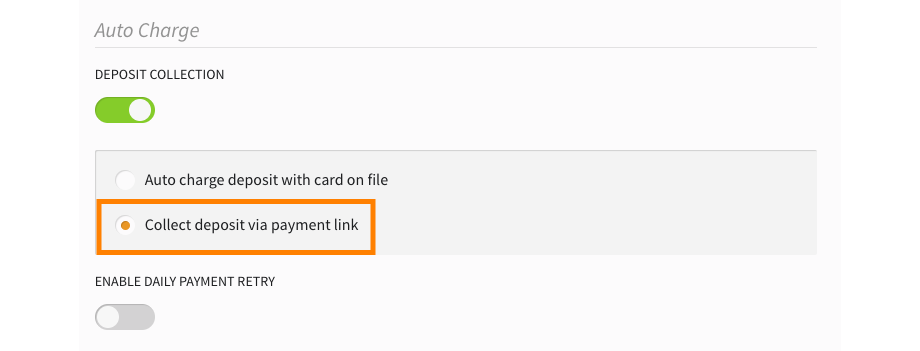
This feature works independently of the Auto Charge Deposit With Card On File setting via Settings > Financials > Financial Settings > Auto Charge, and payment links can be enabled even if Auto Charge Deposit With Card On File is not activated.
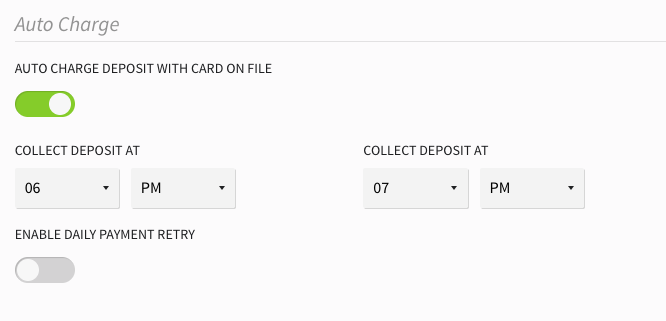
When Payment Links Are Sent:
Payment links are sent automatically based on your deposit timing configuration:
- At Booking: Sent immediately when the reservation is created (valid for 96 hours by default)
- Day of Arrival: Sent during End of Day processing on the arrival date
- Custom Interval: Sent according to your days in advance setting (for example, 5 days before arrival)
Link Behavior:
Payment links expire automatically when guests check in. Links sent for same-day arrivals remain active until check-in occurs.
Activity Tracking:
The reservation Activity Log captures all payment link activity, including when links were sent, their validity period, and status updates.