
Credit Card History / Credit Card Transactions
Hi Paul,
I understand what you are looking for! I wanted to share some tips for tracking down transactions by card using functionality that already exists in Stayntouch today:
If you do not know the exact date the payments were posted or if they were posted over a period of time, you mind find this more helpful than the Transactions page which does limit you to 1 date at a time:
Financials > Journal > Payments > update date range (can be however long you need it to be; the longer it is, the more data to sort through) > expand out the payment type Credit Card, and then the type of Credit Card, and then control or command F on your keyboard to use the "find" function.. search for the last 4 digits of the card. In my example below, I was able to highlight the specific transactions on the Discover card ending in 5904
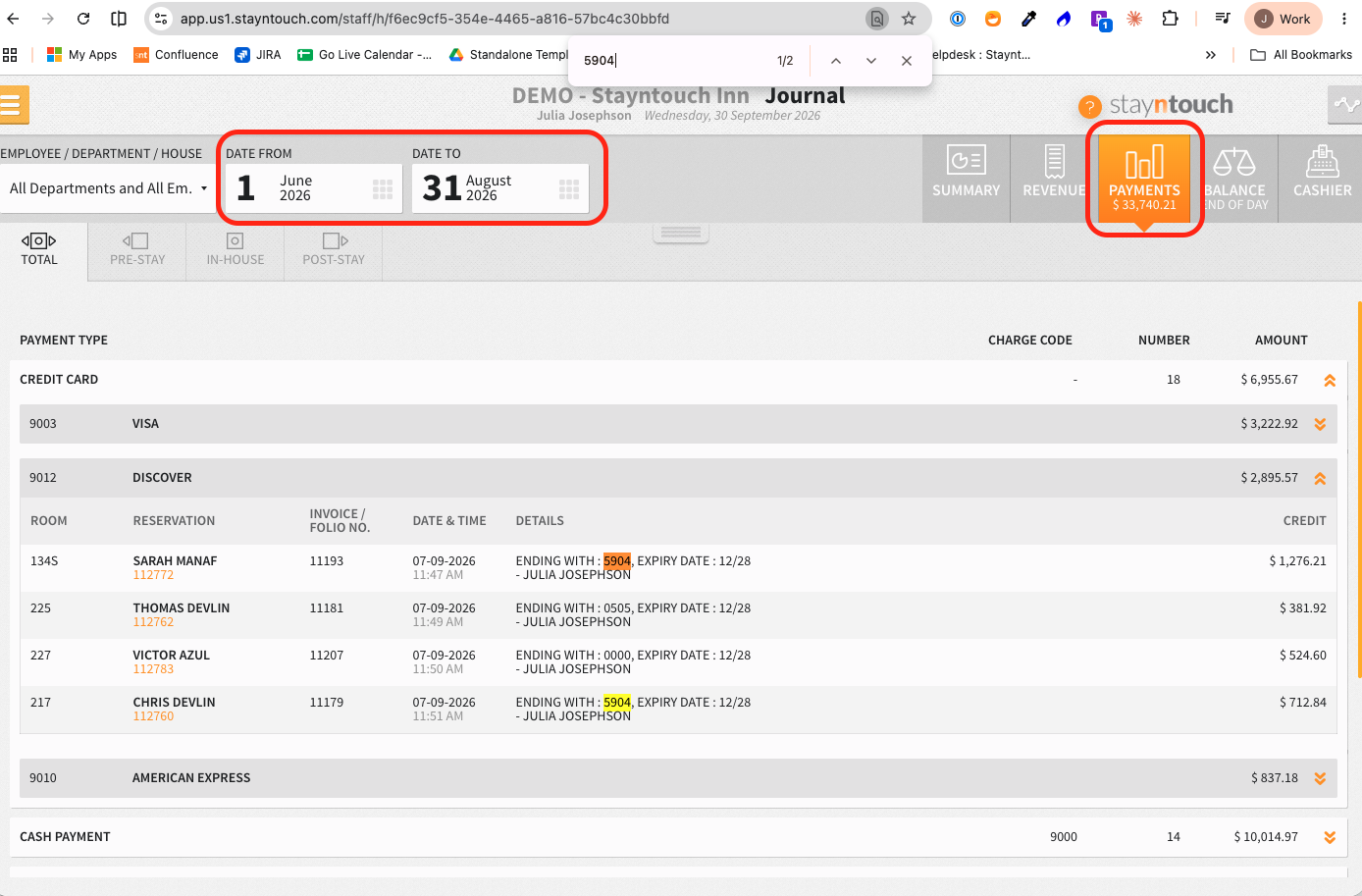
- I like this because then I can click on the confirmation number (in orange under the guest name) to be taken to the guest bill screen where the payment was posted and pull/email an invoice, navigate back to the journal, and do the same for the next one.
- Alternatively, if I need to send a lot of invoices, I just make a note of the INVOICE / FOLIO NO. values and then search for and send them more efficiently/quickly by navigating to Main Menu > Financials > Invoice Search and clicking on the blue button to pull/send the invoice.
- Also, sometimes, when pulling payments made on 1 card, they are for the same amount... if so, you can click on the little gray tab in the middle top of the screen, update the "SEARCH FOR" dropdown to Amount, and then search by the specific amount - that will help filter results if you are looking at a long date range.
- The search on the Journal works best for a shorter date range or when there are limited transactions to comb through as too many records results in pagination. When there are many to sort through, I instead pull the same data in a PDF report version that then I can control/command FIND after downloading: Reports > New Report > Financial Transactions - Payments > update the date range (can filter by payment type if helpful) and run it. Print to Save as PDF and then command or control F on your keyboard to search and find by the last 4 digits. Use the Invoice Search mentioned above to pull/send invoices efficiently.
Hope this helps,
Julia
This is a great tip and something I'll keep in my toolbox.
Thanks.
a card-level transaction search that could pull transactions associated with a particular card, rather than being limited to one guest stay or one date.