
"Information Invoice' Display
4 CommentsSorted by Oldest First
Hi Josh,
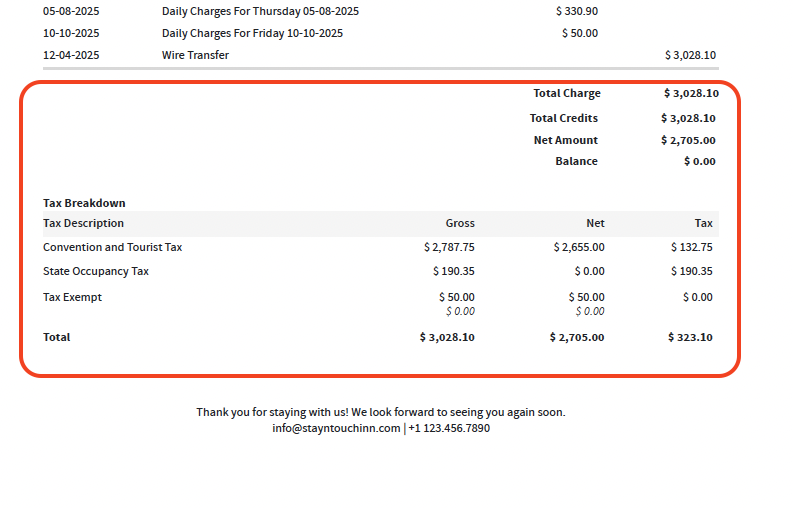
Thank you for taking the time to share your feedback. We will take it into consideration for future enhancement. As a note, you may like enabling in Settings > Financials > Financial Settings > Extended Tax Breakdown. This resolves your note from point number 3.
Best,
Julia
It doesn't look like the balance is on the bottom still in that photo. Does the tax breakdown appear above the Total Charges, Credits, Net Amount, and Balance on the folio receipts went sent via email?
I just feel like the Balance should be at the very bottom of the folio, below everything else.
I hear you - we'll share the feedback. Thanks!
1.) Why does it say "Information Invoice". It seems it'd be less confusing to other companies if it said "Receipt" or "Statement" or "Account Statement". I have a couple companies that complain about it; one of them insists I remove the word "Invoice" so I have to print it, white it out, scan it, and then send it just saying "Information", which isn't a good option either really.
2. Why does it have the, "Total Charges, Taxes, Balance, etc. on EVERY single page of the statement? Please just clean it up and put all that on the bottom of the last page only; it's confusing the way it displays.
3.) Also, why do the "taxes" show up below the "Balance" amount? Please also put the "Balance" line below the taxes lines, so it's on the bottom. It would, likewise, be a lot less confusing for everybody.
Thank you in advance for cleaning it all up and making it look more professional!!!